
AZ-500 · Question #182
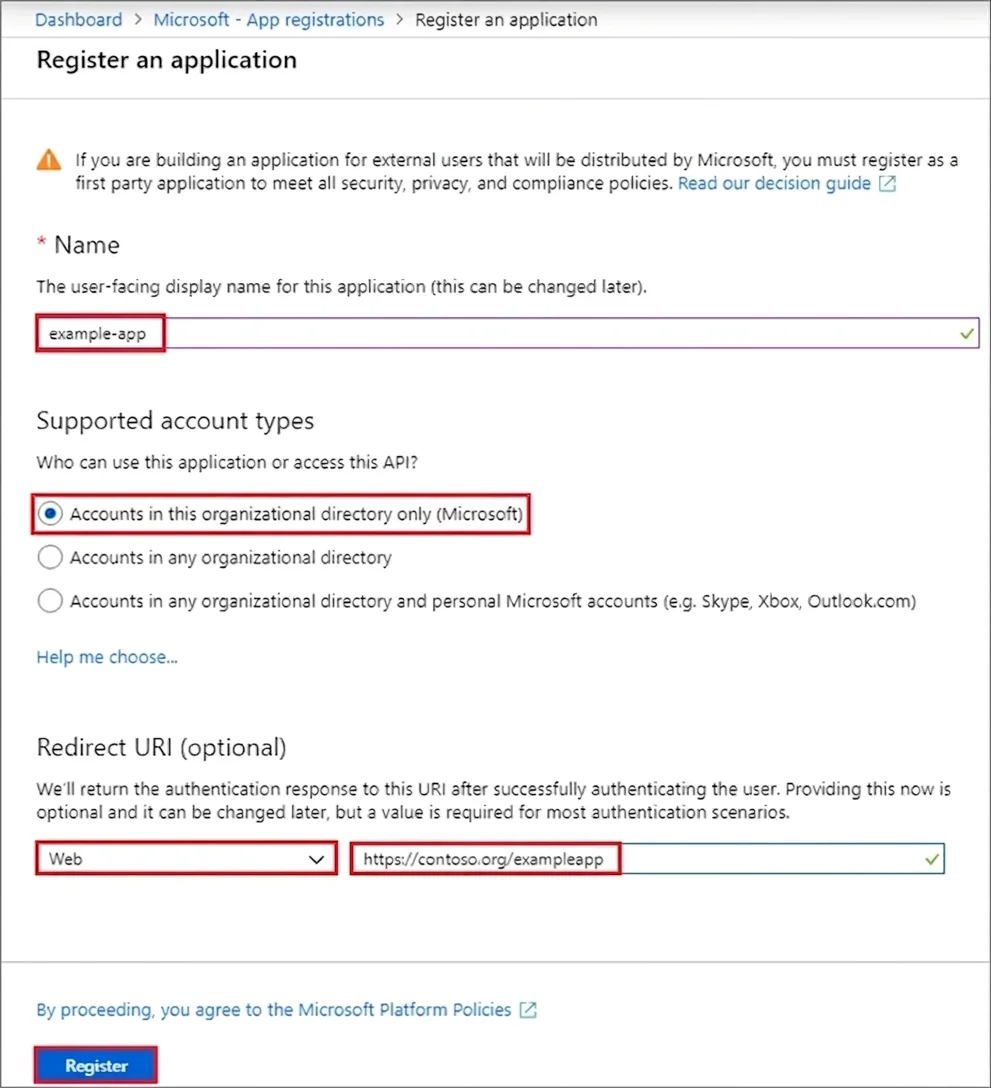
SIMULATION The developers at your company plan to publish an app named App11641655 to Azure. You need to ensure that the app is registered to Azure Active Directory (Azure AD). The registration must…
The correct steps follow the exact Azure AD app registration workflow: navigating to Azure Active Directory > App registrations > New registration, then providing the app name (App11641655), selecting the appropriate account type, and entering the Redirect URI…
Question
Exhibit
Explanation
The correct steps follow the exact Azure AD app registration workflow: navigating to Azure Active Directory > App registrations > New registration, then providing the app name (App11641655), selecting the appropriate account type, and entering the Redirect URI (https://app.contoso.com) with type 'Web' before clicking Register. The Redirect URI in Azure AD app registration serves as the sign-on URL where authentication tokens are sent, making it the correct field to populate with https://app.contoso.com. This is a simulation task with one correct procedural path, so there are no alternative 'wrong options' in the traditional sense - any deviation from these steps (e.g., entering the wrong URI, skipping the Redirect URI field, or using a different registration name) would result in a failed or incomplete registration.
Topics
Community Discussion
No community discussion yet for this question.