
AZ-500 · Question #113
Drag and Drop Question You have an Azure subscription named Sub1. You have an Azure Active Directory (Azure AD) group named Group1 that contains all the members of your IT team. You need to ensure…
The correct answer is Create a JSON file.; Run the New-AzureRmRoleDefinition cmdlet.; Run the New-AzureRmRoleAssignment cmdlet. To grant least-privilege access for VM operations (stop, start, restart), you must create a custom RBAC role. First, you create a JSON file that defines the custom role with only the necessary permissions (Microsoft.Compute/virtualMachines/start/action, stop/action…
Question
Exhibit
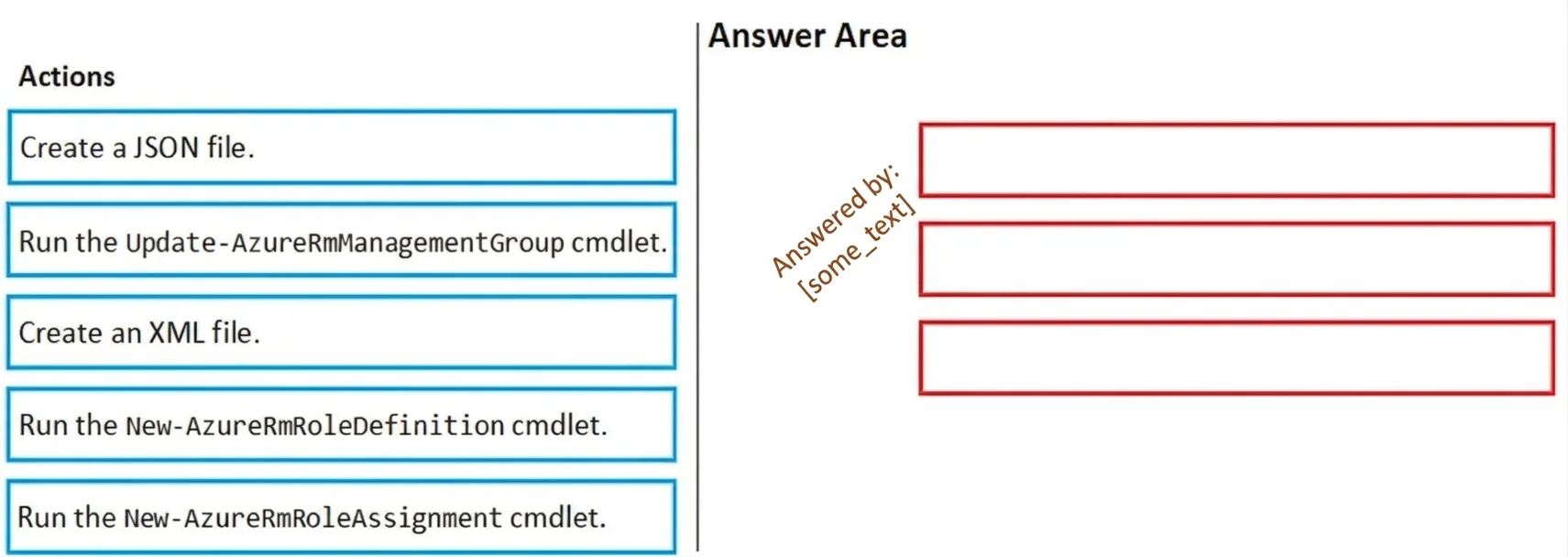
Answer Area
Drag items
Correct arrangement
- Create a JSON file.
- Run the New-AzureRmRoleDefinition cmdlet.
- Run the New-AzureRmRoleAssignment cmdlet.
Explanation
To grant least-privilege access for VM operations (stop, start, restart), you must create a custom RBAC role. First, you create a JSON file that defines the custom role with only the necessary permissions (Microsoft.Compute/virtualMachines/start/action, stop/action, restart/action). Then you run New-AzureRmRoleDefinition to register that custom role definition in Azure using the JSON file. Finally, you run New-AzureRmRoleAssignment to assign the newly created custom role to Group1 at the Sub1 subscription scope.
Topics
Community Discussion
No community discussion yet for this question.