nerdexam
Microsoft

AZ-400 · Question #8

Case Study 2 - Contoso, Ltd Background Contoso, Ltd. is a manufacturing company that has a main office in Chicago. Contoso plans to improve its IT development and operations processes by implementing

The correct sequence for implementing Azure Automation DSC follows three mandatory steps in order: First, create a DSC configuration file with a .ps1 extension (Box1), which defines the desired state using PowerShell DSC syntax. Second, import that configuration into Azure Automa

Submitted by stefanr· Mar 6, 2026Implement and manage infrastructure and configuration using Azure DevOps - specifically provisioning and configuring build/deployment agents and environments using Azure Automation Desired State Configuration (DSC).

Question

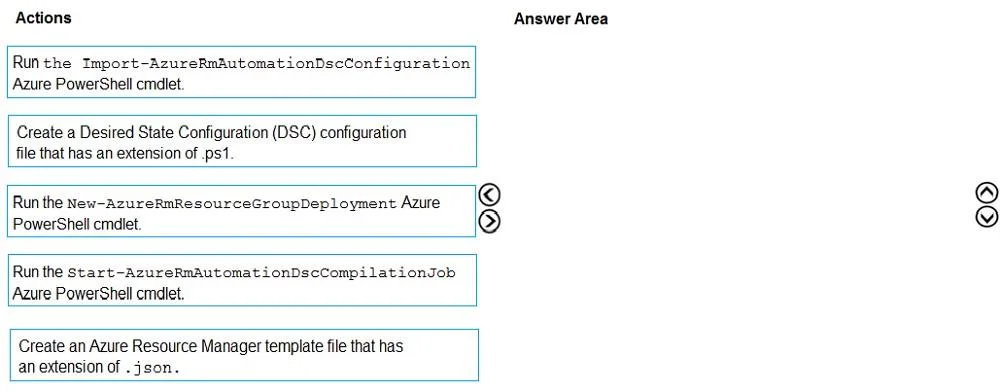
Case Study 2 - Contoso, Ltd Background Contoso, Ltd. is a manufacturing company that has a main office in Chicago. Contoso plans to improve its IT development and operations processes by implementing Azure DevOps principles. Contoso has an Azure subscription and creates an Azure DevOps organization. The Azure DevOps organization includes: The Docker extension A deployment pool named Pool7 that contains 10 Azure virtual machines that run Windows Server 2016 The Azure subscription contains an Azure Automation account. Contoso plans to create projects in Azure DevOps as shown in the following table. Technical requirements Contoso identifies the following technical requirements: Implement build agents for Project1. Whenever possible, use Azure resources. Avoid using deprecated technologies. Implement a code flow strategy for Project2 that will: - Enable Team2 to submit pull requests for Project2. - Enable Team2 to work independently on changes to a copy of Project2. - Ensure that any intermediary changes performed by Team2 on a copy of Project2 will be subject to the same restrictions as the ones defined in the build policy of Project2. Whenever possible implement automation and minimize administrative effort. Implement Project3, Project5, Project6, and Project7 based on the planned changes Implement Project4 and configure the project to push Docker images to Azure Container Registry. Drag and Drop Question You need to configure Azure Automation for the computers in Group7. Which three actions should you perform in sequence? To answer, move the appropriate actions from the list of actions to the answer area and arrange them in the correct order. Answer:

Exhibit

AZ-400 question #8 exhibit

Options

  • Box1Create a Desired State Configuration (DSC) configuration file that has an extension of .ps1.
  • Box2Run the Import-AzureRmAutomationDscConfiguration Azure PowerShell cmdlet.
  • Box3Run the Start-AzureRmAutomationDscCompilationJob Azure PowerShell cmdlet.

Explanation

The correct sequence for implementing Azure Automation DSC follows three mandatory steps in order: First, create a DSC configuration file with a .ps1 extension (Box1), which defines the desired state using PowerShell DSC syntax. Second, import that configuration into Azure Automation using the Import-AzureRmAutomationDscConfiguration cmdlet (Box2), which uploads the .ps1 file to the Automation account. Third, compile the configuration into a node configuration (MOF file) using Start-AzureRmAutomationDscCompilationJob (Box3), which makes the configuration available to assign to managed nodes. This workflow is the standard Azure Automation DSC onboarding process required before any node can be configured.

Topics

#Azure Automation DSC#Desired State Configuration#PowerShell DSC#Infrastructure as Code

Community Discussion

No community discussion yet for this question.

Full AZ-400 Practice