
AZ-400 · Question #603
Hotspot Question You have a GitHub Enterprise account. You have three projects named Project1, Project2, and Project3. Project1 must meet the following requirements: - Perform concurrent testing…
This question tests knowledge of GitHub Actions runner types - GitHub-hosted runners vs. self-hosted runners - and their limitations around concurrency, OS support, job duration, and cost optimization.
Question
Exhibit
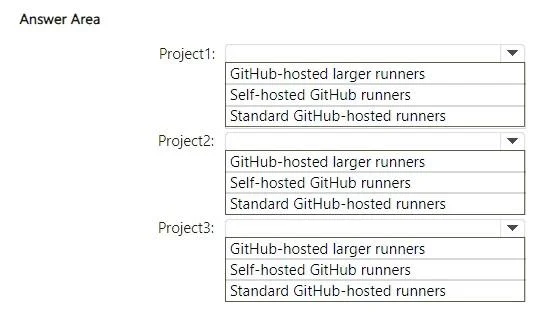
Answer Area
- Project1:GitHub-hosted larger runnersSelf-hosted GitHub runnersStandard GitHub-hosted runners
- Project2:GitHub-hosted larger runnersSelf-hosted GitHub runnersStandard GitHub-hosted runners
- Project3:GitHub-hosted larger runnersSelf-hosted GitHub runnersStandard GitHub-hosted runners
Explanation
This question tests knowledge of GitHub Actions runner types - GitHub-hosted runners vs. self-hosted runners - and their limitations around concurrency, OS support, job duration, and cost optimization.
Approach. Project1 requires 700 concurrent hosts with 5+ hour job durations. GitHub-hosted runners have a concurrency limit (well below 700 for standard accounts) and a 6-hour job limit, so self-hosted runners are required for scale; however, the 5-hour duration fits within GitHub-hosted limits but the 700-host concurrency does not - use self-hosted runners. Project2 requires 35 concurrent macOS hosts with 1+ hour durations. GitHub-hosted macOS runners support up to 5 concurrent jobs on free/team plans, but GitHub Enterprise Cloud supports higher concurrency; however, macOS hosted runners are very expensive at scale - self-hosted runners on macOS minimize cost for 35 concurrent hosts. Project3 requires 200 concurrent Windows hosts with 24+ hour job durations. GitHub-hosted runners have a maximum job duration of 6 hours (35 days for self-hosted), and 200-host concurrency exceeds GitHub-hosted limits - self-hosted runners are mandatory here due to both the 24-hour duration requirement (exceeding the 6-hour GitHub-hosted limit) and the 200-host concurrency. Therefore: Project1 = Self-hosted runners, Project2 = Self-hosted runners (macOS), Project3 = Self-hosted runners (Windows), as all three exceed GitHub-hosted runner constraints in concurrency, duration, or cost.
Concept tested. GitHub Actions runner architecture: understanding the constraints of GitHub-hosted runners (6-hour job limit, limited concurrency, high macOS costs) versus self-hosted runners (no job duration limit beyond 35 days, unlimited concurrency, lower cost at scale), and how to select the right runner type based on project requirements for concurrency, OS, duration, and cost minimization.
Reference. https://docs.github.com/en/actions/using-github-hosted-runners/about-github-hosted-runners and https://docs.github.com/en/actions/hosting-your-own-runners/about-self-hosted-runners
Topics
Community Discussion
No community discussion yet for this question.