
AZ-400 · Question #544
SIMULATION You need to configure a virtual machine template in a DevTest Labs environment named az400- 123456789-dtl1. The operating system must be based on Windows Server 2016 Datacenter. Virtual…
This simulation tests your ability to configure an Azure DevTest Labs environment by creating a custom VM template (formula or base image) with specific artifacts pre-installed for automated testing pipelines.
Question
Exhibit
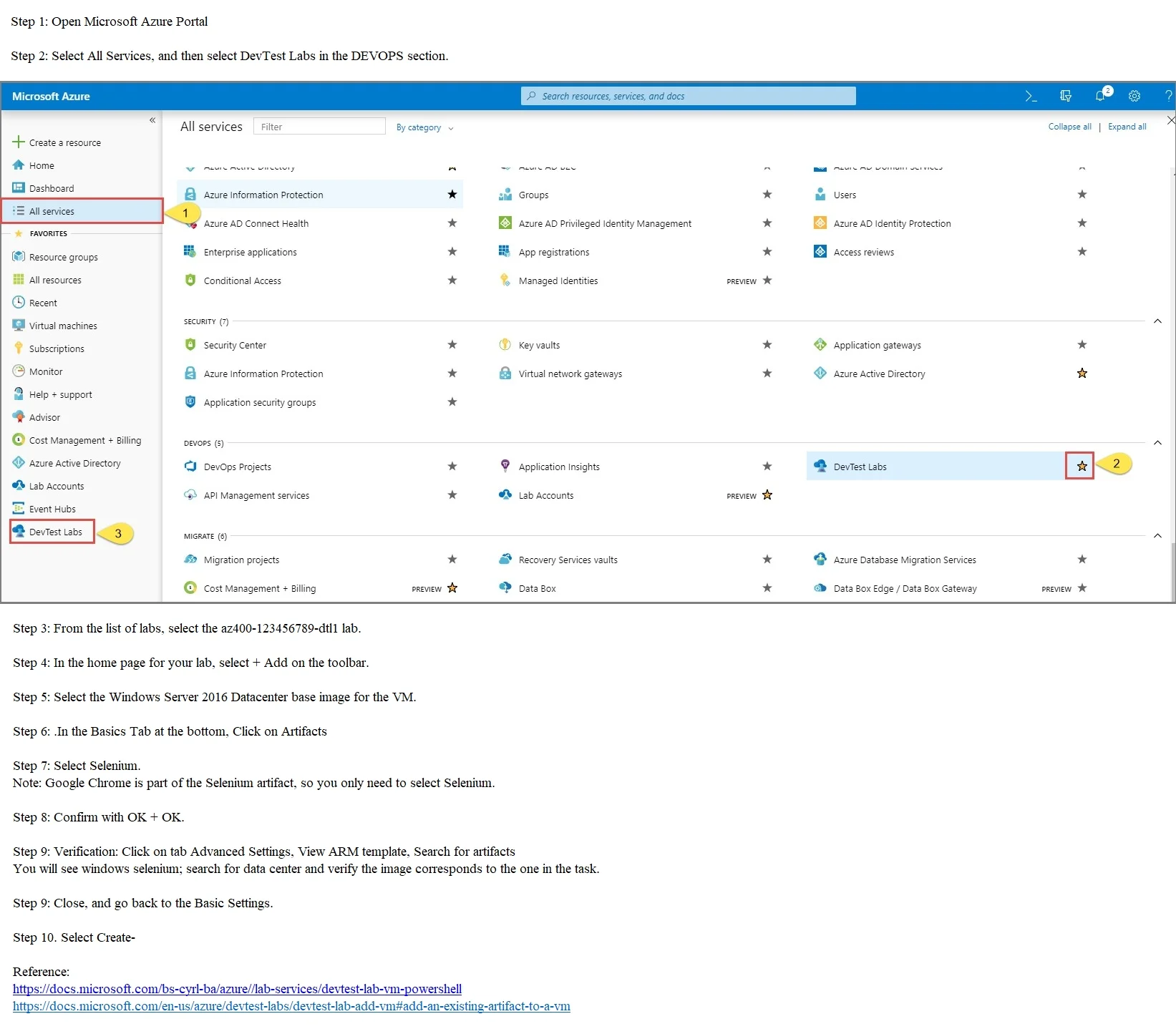
Explanation
This simulation tests your ability to configure an Azure DevTest Labs environment by creating a custom VM template (formula or base image) with specific artifacts pre-installed for automated testing pipelines.
Approach. Navigate to the Azure portal and open the DevTest Lab named 'az400-123456789-dtl1'. Go to 'Configuration and policies' > 'Formulas (reusable bases)' and create a new formula using the 'Windows Server 2016 Datacenter' base image. During formula creation, add artifacts by selecting 'Add Artifact' and searching for and adding both 'Selenium' and 'Google Chrome' from the public artifact repository. Save the formula so that any VM created from this template will automatically have both tools installed. Alternatively, you can navigate to 'My virtual machines' > create a new VM using the Windows Server 2016 base, add the Selenium and Chrome artifacts during VM creation, then capture it as a custom image under 'Configuration and policies' > 'Custom images'.
Concept tested. Azure DevTest Labs VM template configuration - specifically, using Formulas or Custom Images to standardize VM provisioning with pre-installed artifacts (Selenium, Chrome) for CI/CD and automated browser testing workflows in an AZ-400 (DevOps Engineer Expert) context.
Reference. https://learn.microsoft.com/en-us/azure/devtest-labs/devtest-lab-artifact-author
Community Discussion
No community discussion yet for this question.