
AZ-400 · Question #541
SIMULATION You need to create a new team dashboard named Dashboard1 for the default project team of Project1. The dashboard must display the members of the team. Answer:
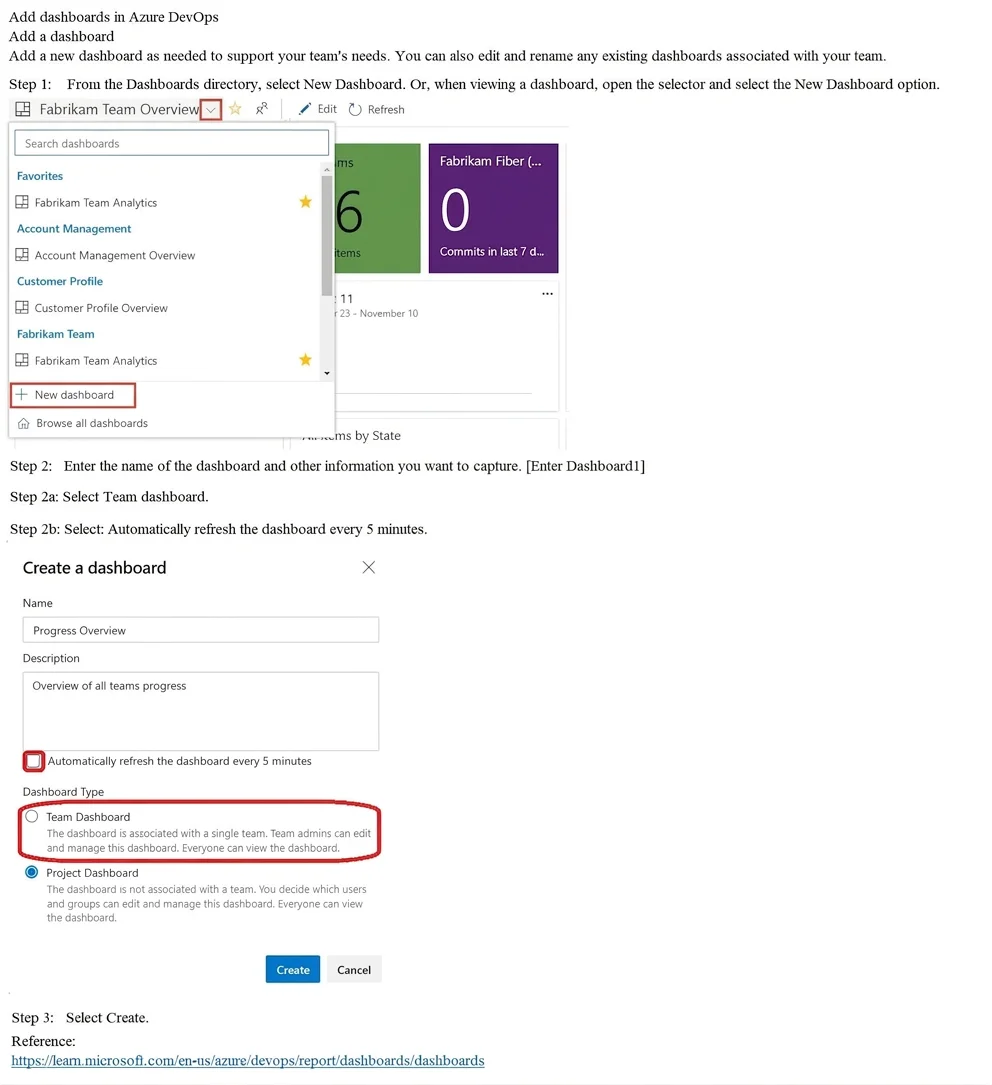
Creating a team dashboard in Azure DevOps requires navigating to the Dashboards section, selecting 'New Dashboard,' specifying the name 'Dashboard1,' and ensuring 'Team Dashboard' is selected so it is scoped to the default project team of Project1. To display team members, you…
Question
Exhibit
Explanation
Creating a team dashboard in Azure DevOps requires navigating to the Dashboards section, selecting 'New Dashboard,' specifying the name 'Dashboard1,' and ensuring 'Team Dashboard' is selected so it is scoped to the default project team of Project1. To display team members, you must add the 'Team Members' widget after the dashboard is created, which is the critical step that satisfies the requirement of showing members of the team. The auto-refresh setting and creation steps are correct, but the simulation is incomplete without adding the Team Members widget post-creation.
Topics
Community Discussion
No community discussion yet for this question.