
AZ-400 · Question #510
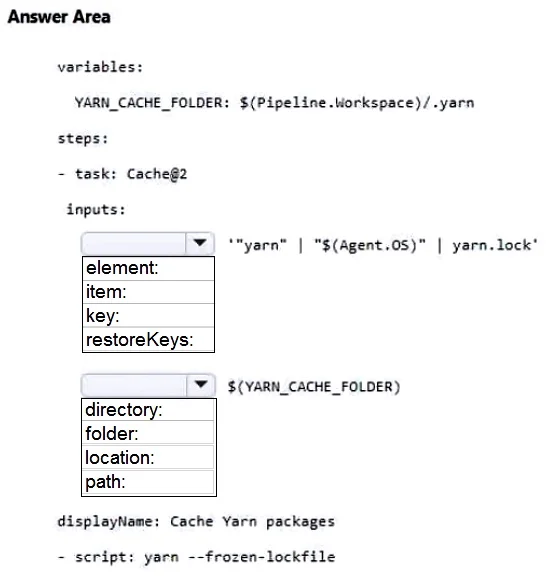
Hotspot Question You have an Azure subscription that contains Azure DevOps build pipelines. You need to implement pipeline caching by using the cache task. How should you complete the YAML…
The correct answer is Select the appropriate input for '"yarn" | "$(Agent.OS)" | yarn.lock': key:; Select the appropriate input for '$(YARN_CACHE_FOLDER)': path. This question tests your knowledge of implementing pipeline caching in Azure DevOps using the Cache task in a YAML pipeline definition. You must correctly specify the task name, version, and required inputs (key and path) for the cache task.
Question
Exhibit
Answer Area
- Select the appropriate input for '"yarn" | "$(Agent.OS)" | yarn.lock'key:element:item:key:restoreKeys:
- Select the appropriate input for '$(YARN_CACHE_FOLDER)'path:directory:folder:location:path:
Explanation
This question tests your knowledge of implementing pipeline caching in Azure DevOps using the Cache task in a YAML pipeline definition. You must correctly specify the task name, version, and required inputs (key and path) for the cache task.
Approach. The correct YAML structure for the Azure DevOps Cache task requires specifying 'task: Cache@2' (using version 2 of the Cache task), then under 'inputs' you must define 'key' (a unique cache key expression, typically combining a hash of dependency files like package-lock.json or pom.xml with the OS, e.g., 'npm | "$(Agent.OS)" | package-lock.json') and 'path' (the directory to cache, such as '$(npm_config_cache)' or 'node_modules'). The key differentiates cache entries across runs and environments, while the path specifies what gets stored and restored. A 'restoreKeys' input can optionally be added as a fallback when an exact key match is not found.
Concept tested. Azure DevOps pipeline caching with the Cache@2 task - specifically, the required YAML syntax including the task identifier ('Cache@2'), the 'key' input (a unique identifier using file hashes and variables), and the 'path' input (the directory to be cached and restored between pipeline runs).
Reference. https://learn.microsoft.com/en-us/azure/devops/pipelines/release/caching?view=azure-devops
Topics
Community Discussion
No community discussion yet for this question.