
AZ-400 · Question #506
Hotspot Question You have a GitHub repository. You plan to use the repository to create a container. You need to configure GitHub Actions to deploy the container to GitHub Container Registry. How…
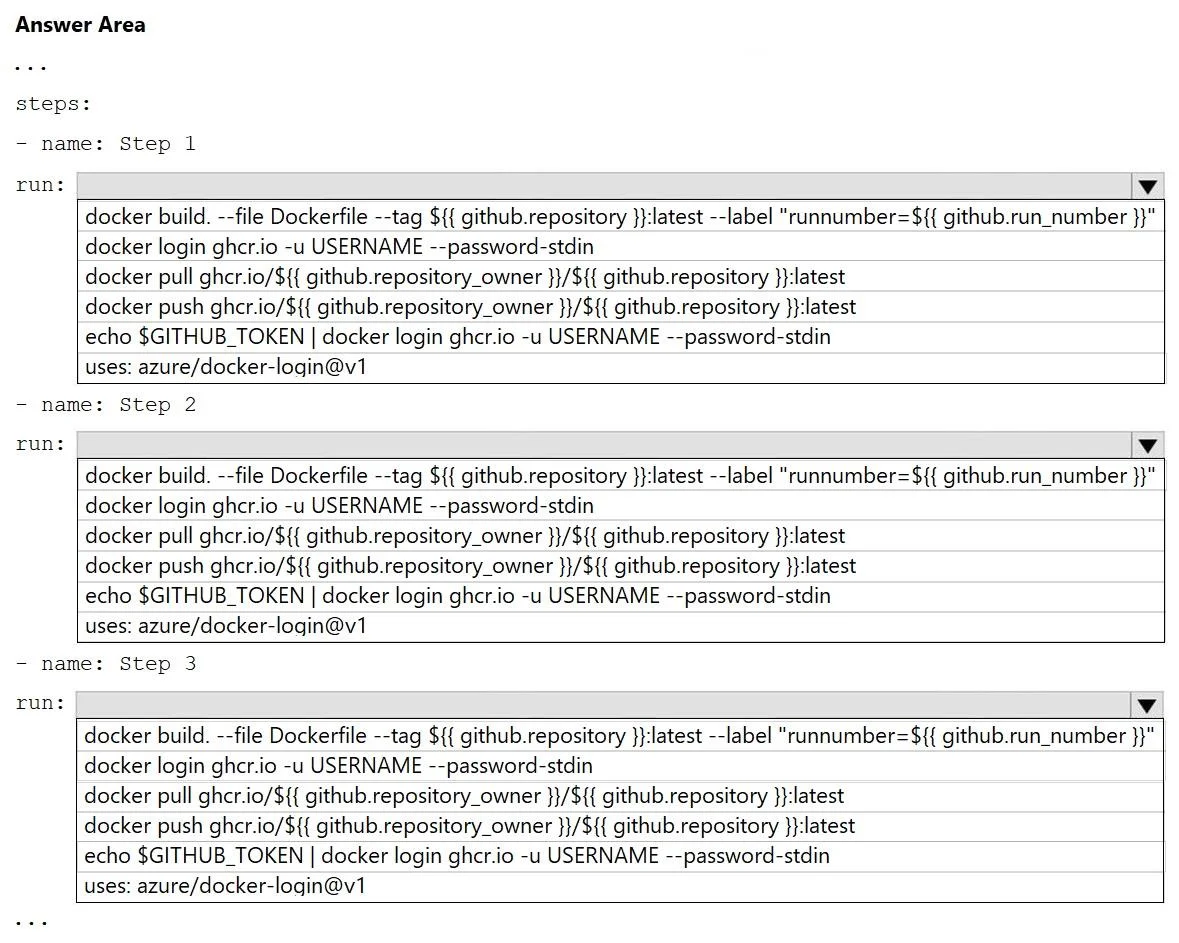
The correct answer is name: Step 1: docker build --file Dockerfile --tag ${ { github.repository } }:latest --label "runnumber=${ { github.run_number } }"; name: Step 2: echo $GITHUB_TOKEN | docker login ghr.io -u USERNAME --password-stdin; name: Step 3: docker push ghr.io/${ { github.repository_owner } }/${ { github.repository } }:latest. This question requires configuring a GitHub Actions workflow to build a container image and deploy it to GitHub Container Registry. The process involves three main steps: Step 1: Build the Docker Image The correct command is docker build --file Dockerfile --tag ${ {…
Question
Exhibit
Answer Area
- name: Step 1docker build --file Dockerfile --tag ${ { github.repository } }:latest --label "runnumber=${ { github.run_number } }"docker build --file Dockerfile --tag ${ { github.repository } }:latest --label "runnumber=${ { github.run_number } }"docker login ghr.io -u USERNAME --password-stdindocker pull ghr.io/${ { github.repository_owner } }/${ { github.repository } }:latestdocker push ghr.io/${ { github.repository_owner } }/${ { github.repository } }:latestecho $GITHUB_TOKEN | docker login ghr.io -u USERNAME --password-stdinuses: azure/docker-login@v1
- name: Step 2echo $GITHUB_TOKEN | docker login ghr.io -u USERNAME --password-stdindocker build --file Dockerfile --tag ${ { github.repository } }:latest --label "runnumber=${ { github.run_number } }"docker login ghr.io -u USERNAME --password-stdindocker pull ghr.io/${ { github.repository_owner } }/${ { github.repository } }:latestdocker push ghr.io/${ { github.repository_owner } }/${ { github.repository } }:latestecho $GITHUB_TOKEN | docker login ghr.io -u USERNAME --password-stdinuses: azure/docker-login@v1
- name: Step 3docker push ghr.io/${ { github.repository_owner } }/${ { github.repository } }:latestdocker build --file Dockerfile --tag ${ { github.repository } }:latest --label "runnumber=${ { github.run_number } }"docker login ghr.io -u USERNAME --password-stdindocker pull ghr.io/${ { github.repository_owner } }/${ { github.repository } }:latestdocker push ghr.io/${ { github.repository_owner } }/${ { github.repository } }:latestecho $GITHUB_TOKEN | docker login ghr.io -u USERNAME --password-stdinuses: azure/docker-login@v1
Explanation
This question requires configuring a GitHub Actions workflow to build a container image and deploy it to GitHub Container Registry. The process involves three main steps:
-
Step 1: Build the Docker Image The correct command is
docker build --file Dockerfile --tag ${ { github.repository } }:latest --label "runnumber=${ { github.run_number } }". This command builds the Docker image from theDockerfilein the repository. It tags the image with the repository name andlatesttag, using thegithub.repositorycontext variable. Additionally, it adds a label to the image containing the GitHub Actions run number, provided bygithub.run_number. -
Step 2: Log in to GitHub Container Registry The correct command is
echo $GITHUB_TOKEN | docker login ghr.io -u USERNAME --password-stdin. Before pushing an image, authentication to the container registry is necessary. This command uses theGITHUB_TOKEN(a temporary token automatically generated by GitHub Actions) to log intoghr.io(the domain for GitHub Container Registry). The token is piped todocker loginvia standard input (--password-stdin). WhileUSERNAMEis provided in the option, withGITHUB_TOKENand--password-stdin, the actual username usually isn't critical or can beGITHUB_ACTOR. -
Step 3: Push the Docker Image to GitHub Container Registry The correct command is
docker push ghr.io/${ { github.repository_owner } }/${ { github.repository } }:latest. After building the image and authenticating, this command pushes the locally built and tagged image to the GitHub Container Registry. The image name follows the patternghr.io/<owner>/<repository-name>:<tag>, constructed using thegithub.repository_ownerandgithub.repositorycontext variables along with thelatesttag.
Topics
Community Discussion
No community discussion yet for this question.