
AZ-400 · Question #444
Hotspot Question You have a project in Azure DevOps that contains a release pipeline. The pipeline contains two stages named QA and Prod. QA deploys code to an Azure web app named webapp1. Prod…
This question tests knowledge of Azure DevOps release pipeline gates and approvals, specifically how to use post-deployment and pre-deployment conditions to block downstream deployments based on Application Insights alert metrics.
Question
Exhibit
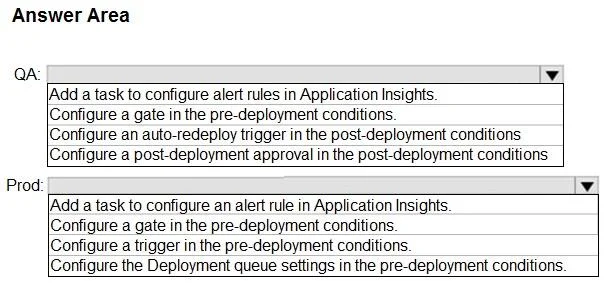
Answer Area
- QAAdd a task to configure alert rules in Application Insights.Configure a gate in the pre-deployment conditions.Configure an auto-redeploy trigger in the post-deployment conditionsConfigure a post-deployment approval in the post-deployment conditions
- ProdAdd a task to configure an alert rule in Application Insights.Configure a gate in the pre-deployment conditions.Configure a trigger in the pre-deployment conditions.Configure the Deployment queue settings in the pre-deployment conditions.
Explanation
This question tests knowledge of Azure DevOps release pipeline gates and approvals, specifically how to use post-deployment and pre-deployment conditions to block downstream deployments based on Application Insights alert metrics.
Approach. For the QA stage, you should add a Post-deployment gate that queries Azure Monitor (Application Insights) for Failed requests alerts. This gate runs AFTER the deployment to webapp1 completes and monitors for alert conditions. For the Prod stage, you should add a Pre-deployment gate (or approval condition) that checks Azure Monitor alerts, ensuring that if Application Insights has generated Failed requests alerts from the QA deployment, the Prod stage deployment to webapp2 is blocked before it begins. Together, the QA post-deployment gate monitors health after deploying to webapp1, and the Prod pre-deployment gate prevents promotion to webapp2 if those alerts are active - this is the standard pattern for quality gates in Azure DevOps release pipelines.
Concept tested. Azure DevOps Release Pipeline Gates - specifically the use of Post-deployment gates on the QA stage to monitor Application Insights alerts after deploying to webapp1, and Pre-deployment gates/approvals on the Prod stage to block deployment to webapp2 when failure alerts are detected. Gates integrate with Azure Monitor and Application Insights to enforce quality criteria between pipeline stages.
Reference. https://learn.microsoft.com/en-us/azure/devops/pipelines/release/approvals/gates?view=azure-devops
Topics
Community Discussion
No community discussion yet for this question.