
AZ-400 · Question #398
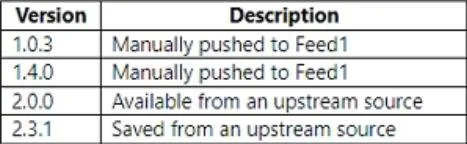
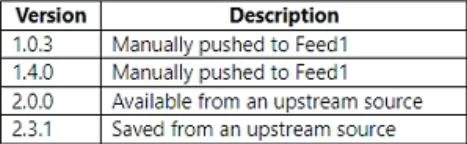
You have a project in Azure DevOps named Project1 that references an Azure Artifacts feed named Feed1. You have a package named Package1 that has the versions shown in the following table. You need…
The correct answer is D. 2.3.1. When performing a build of Project1, the version of Package1 that will be used depends on the specific configuration of the build pipeline and how the package is referenced within the pipeline. By default, the build pipeline in Azure DevOps will use the latest version of the…
Question
Exhibits
Options
- A1.0.3
- B1.4.0
- C2.0.0
- D2.3.1
How the community answered
(31 responses)- A6% (2)
- B13% (4)
- C3% (1)
- D77% (24)
Explanation
When performing a build of Project1, the version of Package1 that will be used depends on the specific configuration of the build pipeline and how the package is referenced within the pipeline. By default, the build pipeline in Azure DevOps will use the latest version of the package available in the specified feed. In this case, the versions of Package1 are listed in the following order: If no specific version is specified in the build pipeline, it will use the latest version, which in this case is 2.3.1 (the most recent version available). Therefore, during the build of Project1, Version 2.3.1 of Package1 will be used unless a different version is explicitly specified in the build pipeline configuration or dependencies.
Community Discussion
No community discussion yet for this question.