nerdexam
Microsoft

AZ-400 · Question #192

SIMULATION You manage a website that uses an Azure SQL Database named db1 in a resource group named RG1lod11566895. You need to modify the SQL database to protect against SQL injection. To complete th

Enabling Advanced Data Security (specifically Advanced Threat Protection) on the Azure SQL Database is the correct approach because it provides built-in detection of anomalous activities, including potential SQL injection attempts, by monitoring and analyzing database traffic pat

Submitted by kim_seoul· Mar 6, 2026Implement and Manage Data Protection / Secure Azure Solutions - specifically configuring threat detection and security policies for Azure SQL Database resources within the AZ-500 (Azure Security Engineer) or AZ-104 (Azure Administrator) certification domains.

Question

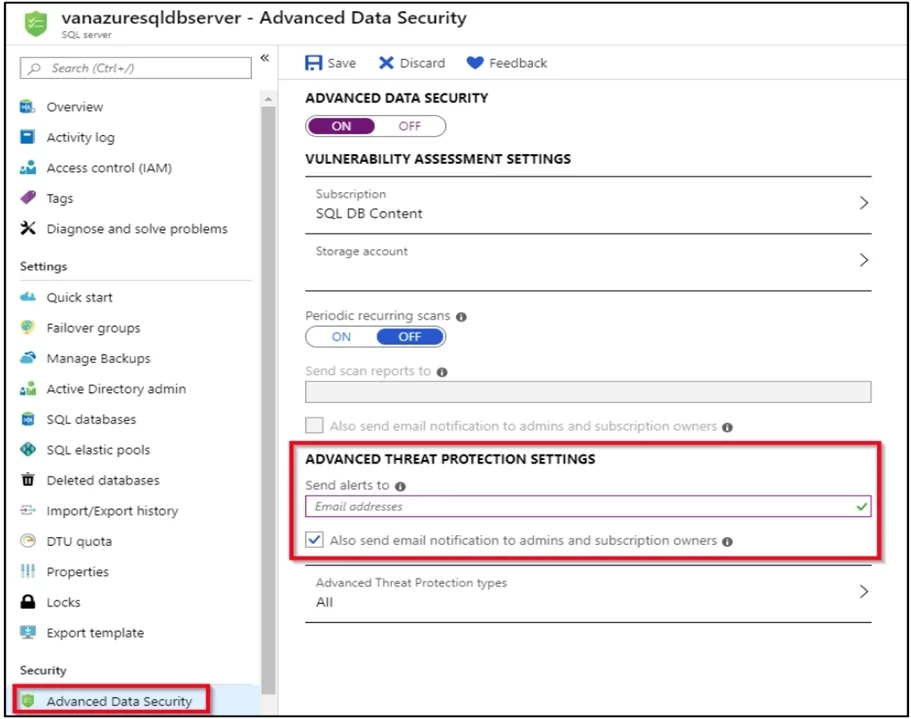
SIMULATION You manage a website that uses an Azure SQL Database named db1 in a resource group named RG1lod11566895. You need to modify the SQL database to protect against SQL injection. To complete this task, sign in to the Microsoft Azure portal. Answer: Set up Advanced Threat Protection in the Azure portal 1. Sign into the Azure portal. 2. Navigate to the configuration page of the server you want to protect. In the security settings, select Advanced Data Security. 3. On the Advanced Data Security configuration page: 4. Enable Advanced Data Security on the server. Note: Advanced Threat Protection for Azure SQL Database detects anomalous activities indicating unusual and potentially harmful attempts to access or exploit databases. Advanced Threat Protection can identify Potential SQL injection, Access from unusual location or data center, Access from unfamiliar principal or potentially harmful application, and Brute force SQL credentials Reference: https://docs.microsoft.com/en-us/azure/storage/common/storage-account-create https://docs.microsoft.com/en-us/azure/azure-sql/database/threat-detection-configure

Exhibit

AZ-400 question #192 exhibit

Explanation

Enabling Advanced Data Security (specifically Advanced Threat Protection) on the Azure SQL Database is the correct approach because it provides built-in detection of anomalous activities, including potential SQL injection attempts, by monitoring and analyzing database traffic patterns. Advanced Threat Protection sends alerts when it detects suspicious activities such as SQL injection, unusual access patterns, or brute force attacks, allowing administrators to investigate and respond to threats in real time. This is the Microsoft-recommended method for protecting Azure SQL Databases against SQL injection without requiring changes to application code.

Topics

#Azure SQL Database Security#Advanced Threat Protection#Advanced Data Security#SQL Injection Prevention

Community Discussion

No community discussion yet for this question.

Full AZ-400 Practice