
Microsoft
AZ-400 · Question #163
You have a private distribution group that contains provisioned and unprovisioned devices. You need to distribute a new iOS application to the distribution group by using Microsoft Visual Studio App…
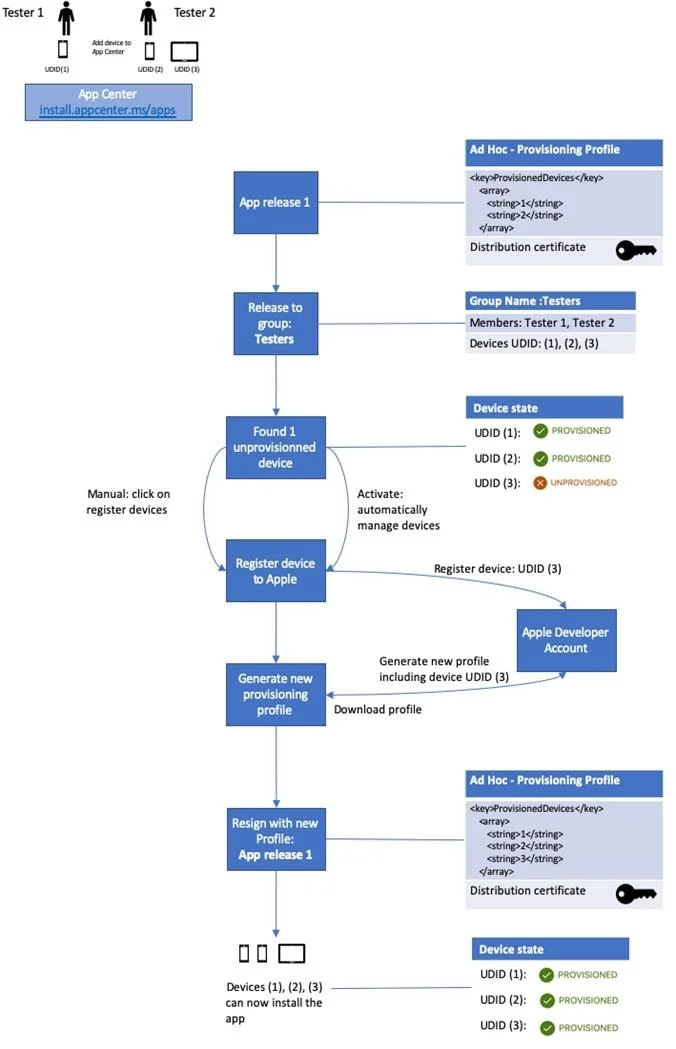
The correct answer is A. Select Register devices and sign my app. The following diagram displays the entire app re-signing flow in App Center. Incorrect Answers: B: Only one .p12 file for the app, not one for each device. https://docs.microsoft.com/hu-hu/appcenter/distribution/auto-provisioning
Submitted by akirajp· Mar 6, 2026Design and implement build and release pipelines
Question
You have a private distribution group that contains provisioned and unprovisioned devices. You need to distribute a new iOS application to the distribution group by using Microsoft Visual Studio App Center. What should you do?
Exhibit
Options
- ASelect Register devices and sign my app.
- BGenerate a new .p12 file for each device.
- CCreate an active subscription in App Center Test.
- DAdd the device owner to the collaborators group.
How the community answered
(37 responses)- A86% (32)
- B8% (3)
- C3% (1)
- D3% (1)
Explanation
The following diagram displays the entire app re-signing flow in App Center. Incorrect Answers: B: Only one .p12 file for the app, not one for each device. https://docs.microsoft.com/hu-hu/appcenter/distribution/auto-provisioning
Community Discussion
No community discussion yet for this question.