nerdexam
MicrosoftMicrosoft

AZ-400 · Question #126

AZ-400 Question #126: Real Exam Question with Answer & Explanation

The correct approach follows the two-phase setup required to integrate Application Insights with an Azure web app: first provisioning the Application Insights resource in the Azure portal with the correct name (az400-9940427-main), then connecting the web app to that resource by

Submitted by luis.pe· Mar 6, 2026Implement continuous feedback - Configure and integrate monitoring tools, including Application Insights, to collect and analyze telemetry data from Azure-hosted applications as part of the AZ-400 DevOps monitoring and feedback domain.

Question

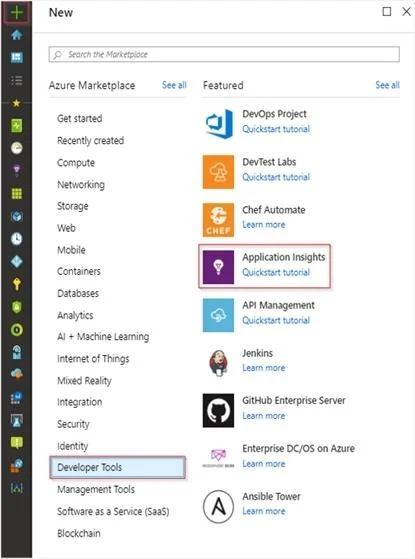
SIMULATION You need to create an instance of Azure Application Insights named az400-9940427-main and configure the instance to receive telemetry data from an Azure web app named az400-9940427- main. To complete this task, sign in to the Microsoft Azure portal. Answer: Step 1: Create an instance of Azure Application Insights 1. Open Microsoft Azure Portal 2. Log into your Azure account, Select Create a resource > Developer tools > Application Insights. 3. Enter the following settings, and then select Review + create. Name: az400-9940427-main Step 2: Configure App Insights SDK 4. Open your ASP.NET Core Web App project in Visual Studio > Right-click on the AppName in the Solution Explorer > Select Add > Application Insights Telemetry. 5. Click the Get Started button 6. Select your account and subscription > Select the Existing resource you created in the Azure portal > Click Register. References: https://docs.microsoft.com/bs-latn-ba/azure/azure-monitor/learn/dotnetcore-quick-start?view=vs- 2017

Options

  • taskCreate an instance of Azure Application Insights named az400-9940427-main and configure the instance to receive telemetry data from an Azure web app named az400-9940427-main.
  • prerequisitesAzure portal access and an existing ASP.NET Core Web App project in Visual Studio.

Explanation

The correct approach follows the two-phase setup required to integrate Application Insights with an Azure web app: first provisioning the Application Insights resource in the Azure portal with the correct name (az400-9940427-main), then connecting the web app to that resource by adding the Application Insights SDK via Visual Studio and linking it to the existing resource. This ensures telemetry data flows from the web app to the Application Insights instance by registering the correct instrumentation key/connection string. The process correctly uses the 'Existing resource' option to bind the pre-created Application Insights instance rather than creating a new one during SDK setup.

Topics

#Azure Application Insights#Azure Monitor#Telemetry Configuration#ASP.NET Core Web Apps

Community Discussion

No community discussion yet for this question.

Full AZ-400 PracticeBrowse All AZ-400 Questions