
AZ-305 · Question #370
Hotspot Question You have an Azure subscription. The subscription contains 100 virtual machine that run Windows Server. You need to recommend a solution that will provide monitoring and an audit…
This question tests your knowledge of Azure monitoring tools for tracking specific types of changes on Windows Server VMs, specifically registry changes versus DNS setting changes.
Question
Exhibit
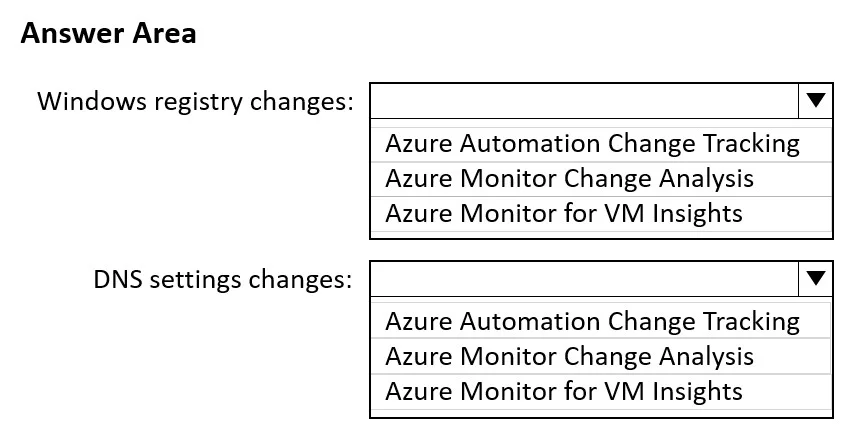
Answer Area
- Windows registry changes:Azure Automation Change TrackingAzure Monitor Change AnalysisAzure Monitor for VM Insights
- DNS settings changes:Azure Automation Change TrackingAzure Monitor Change AnalysisAzure Monitor for VM Insights
Explanation
This question tests your knowledge of Azure monitoring tools for tracking specific types of changes on Windows Server VMs, specifically registry changes versus DNS setting changes.
Approach. For changes to the Windows registry, you should use Microsoft Defender for Cloud (formerly Azure Security Center) with the File Integrity Monitoring (FIM) feature, which tracks changes to Windows registry keys, files, and Linux files on VMs. For changes to DNS settings of the virtual machines, you should use Azure Activity Log or Azure Policy - however, the most appropriate recommendation is Microsoft Defender for Cloud's File Integrity Monitoring for registry changes, and Azure Monitor / Change Tracking (part of Azure Automation) for DNS setting changes. Specifically, Change Tracking and Inventory (via Azure Automation/Azure Monitor) monitors Windows registry changes, services, software, and files, while Azure Activity Log captures control-plane changes like DNS settings modifications made through Azure Resource Manager. The minimal administrative effort requirement points to using Change Tracking and Inventory for registry changes and Azure Activity Log for DNS setting changes on the VM network interface.
Concept tested. Understanding the distinction between Azure monitoring tools: Change Tracking and Inventory (Azure Automation) monitors OS-level changes like registry keys and services on VMs, while Azure Activity Log captures Azure Resource Manager-level changes such as modifications to DNS settings on network interfaces - both minimizing administrative effort through native Azure integration.
Reference. https://learn.microsoft.com/en-us/azure/automation/change-tracking/overview | https://learn.microsoft.com/en-us/azure/azure-monitor/essentials/activity-log
Topics
Community Discussion
No community discussion yet for this question.