
AZ-305 · Question #324
Hotspot Question You have an Azure subscription that contains 50 Azure SQL databases. You create an Azure Resource Manager (ARM) template named Template1 that enables Transparent Data Encryption…
This question tests your knowledge of Azure Policy definitions, specifically how to configure a policy that uses a DeployIfNotExists effect with an ARM template to remediate noncompliant resources automatically.
Question
Exhibit
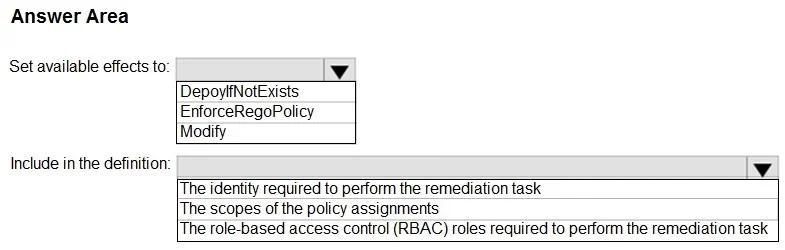
Answer Area
- Set available effects to:DepoyIfNotExistsEnforceRegoPolicyModify
- Include in the definition:The identity required to perform the remediation taskThe scopes of the policy assignmentsThe role-based access control (RBAC) roles required to perform the remediation task
Explanation
This question tests your knowledge of Azure Policy definitions, specifically how to configure a policy that uses a DeployIfNotExists effect with an ARM template to remediate noncompliant resources automatically.
Approach. For Policy1, the Policy Effect should be set to 'DeployIfNotExists' because this effect allows Azure Policy to deploy an ARM template (Template1) to remediate noncompliant resources - in this case, SQL databases that do not have TDE enabled. The Policy Rule condition should check if TDE is disabled (i.e., the field 'properties.state' equals 'Disabled'), and the deployment section should reference Template1 to enable TDE. The 'DeployIfNotExists' effect is the only built-in policy effect that can trigger an ARM template deployment as a remediation action, making it the correct choice over effects like 'Audit', 'Deny', or 'AuditIfNotExists' which cannot perform automated remediation via templates. A managed identity must also be assigned to the policy assignment so it has the necessary permissions to execute the deployment.
Concept tested. Azure Policy effects - specifically understanding when to use 'DeployIfNotExists' versus other effects (Audit, AuditIfNotExists, Deny) for automated remediation using ARM templates, and how to structure a policy definition that references a deployment template to bring noncompliant resources into compliance.
Reference. https://learn.microsoft.com/en-us/azure/governance/policy/concepts/effects#deployifnotexists
Topics
Community Discussion
No community discussion yet for this question.