
AZ-305 · Question #285
Hotspot Question You have an Azure subscription that contains an Azure key vault named KV1 and a virtual machine named VM1. VM1 runs Windows Server 2022: Azure Edition. You plan to deploy an ASP.Net…
This question tests how to configure an ASP.NET Core application to use a system-assigned managed identity to securely access Azure Key Vault secrets with minimal development effort.
Question
Exhibit
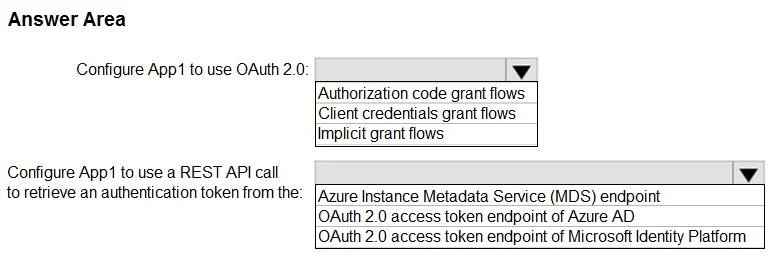
Answer Area
- Configure App1 to use OAuth 2.0:Authorization code grant flowsClient credentials grant flowsImplicit grant flows
- Configure App1 to use a REST API call to retrieve an authentication token from the:Azure Instance Metadata Service (MDS) endpointOAuth 2.0 access token endpoint of Azure ADOAuth 2.0 access token endpoint of Microsoft Identity Platform
Explanation
This question tests how to configure an ASP.NET Core application to use a system-assigned managed identity to securely access Azure Key Vault secrets with minimal development effort.
Approach. First, enable the system-assigned managed identity on VM1 via the Azure portal (Identity blade) or Azure CLI, then grant that managed identity 'Get' secret permissions on KV1 using an access policy or Azure RBAC role (Key Vault Secrets User). In the ASP.NET Core application, use the Azure.Extensions.AspNetCore.Configuration.Secrets NuGet package and configure the Key Vault configuration provider using 'DefaultAzureCredential' from the Azure.Identity package - this automatically picks up the VM's managed identity at runtime without storing any credentials in code. This approach requires minimal development effort because DefaultAzureCredential handles authentication transparently, and the Key Vault configuration provider maps secrets directly to the .NET configuration system.
Concept tested. System-assigned managed identities for Azure VMs, Azure Key Vault access control (RBAC or access policies), and ASP.NET Core Key Vault configuration integration using DefaultAzureCredential to eliminate credential management in code.
Reference. https://learn.microsoft.com/en-us/aspnet/core/security/key-vault-configuration and https://learn.microsoft.com/en-us/azure/active-directory/managed-identities-azure-resources/how-to-use-vm-token
Topics
Community Discussion
No community discussion yet for this question.