
AZ-305 · Question #237
A company has a set of 10 Virtual Machines created in their Azure subscription. There is a requirement to ensure that an IT administrator gets an email whenever the following operations are…
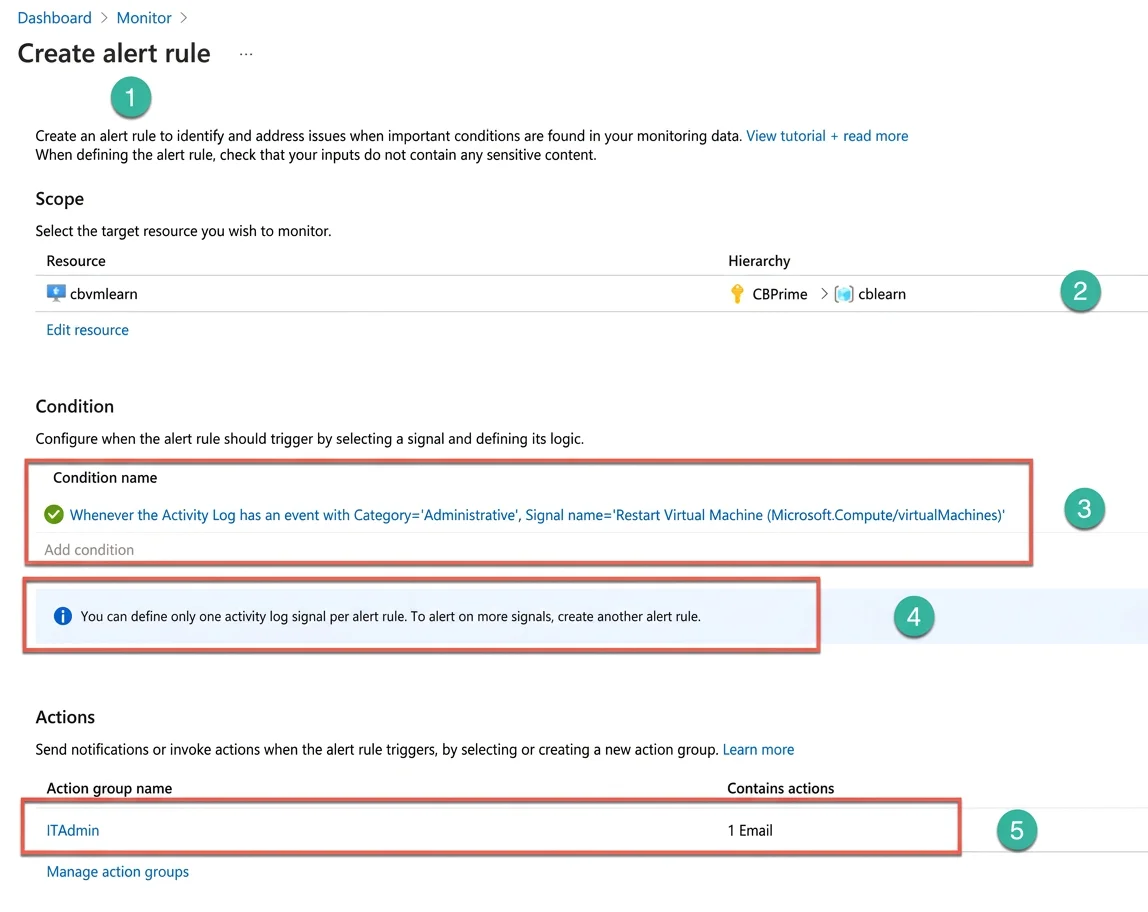
The correct answer is A. Three rules C. One action group. To monitor the three events in Azure Monitor, you need to create 3 separate rules for each requirement. When you open from Azure Monitor blade the Alerts screen and select the "New Alert Rule" link, the Azure portal opens the “Create alert rule” screen (Number 1). You need to…
Question
Exhibit
Options
- AThree rules
- BOne rule
- COne action group
- DThree action groups
How the community answered
(35 responses)- A71% (25)
- B11% (4)
- D17% (6)
Explanation
To monitor the three events in Azure Monitor, you need to create 3 separate rules for each requirement. When you open from Azure Monitor blade the Alerts screen and select the "New Alert Rule" link, the Azure portal opens the “Create alert rule” screen (Number 1). You need to fill the sections on this panel. First, you select a scope for the monitoring (Number 2): your VM, subscription, and resource group. Then, you choose the Activity Log event (signal) to trigger the alert (Number 3) under the Condition section. You can create only one alert per event (Number 4). Next, you add an Action group that will send a notification email (Number 5), provide a rule name, and create it. After creating three alert rules, you can review them on the "Alert rules" screen. And you can review the Action group on the "Manage actions" screen as well. In the end, you have three rules and one action group. https://docs.microsoft.com/en-us/azure/azure-monitor/platform/alerts-overview
Community Discussion
No community discussion yet for this question.