
AZ-305 · Question #224
Hotspot Questiom Your company wants to maintain Activity log and resource log information for auditing and static analysis. The data must remain available for up to six months. You need to identify…
The correct answer is You can use the Azure Monitor menu in Azure portal to configure archive storage. = Yes; You can create an Azure storage account for log storage in the same subscription as the resource sending the logs only. = No; You can configure Blob storage policies to require time-based retention. = Yes. This question tests knowledge of Azure Monitor log retention, storage solutions, and diagnostic settings for Activity Logs and Resource Logs to meet a 6-month retention requirement for auditing and static analysis.
Question
Exhibit
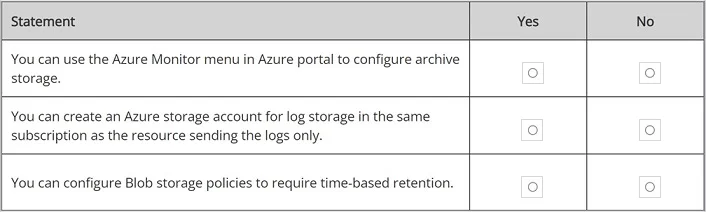
Answer Area
- You can use the Azure Monitor menu in Azure portal to configure archive storage.Yes
- You can create an Azure storage account for log storage in the same subscription as the resource sending the logs only.No
- You can configure Blob storage policies to require time-based retention.Yes
Explanation
This question tests knowledge of Azure Monitor log retention, storage solutions, and diagnostic settings for Activity Logs and Resource Logs to meet a 6-month retention requirement for auditing and static analysis.
Approach. Azure Monitor Activity Logs are retained for only 90 days by default, so to retain them for up to 6 months, you must export/archive them to Azure Storage Account or route them to a Log Analytics Workspace with a retention policy set to 180 days. Resource Logs (diagnostic logs) must be explicitly enabled via Diagnostic Settings and routed to a destination such as a Storage Account (for archival/static analysis), Log Analytics Workspace (for querying), or Event Hub (for streaming). A Storage Account is ideal for long-term archival and static analysis as it supports retention up to years and is cost-effective. Log Analytics Workspace supports retention up to 730 days and is better suited for interactive queries. Azure Monitor Diagnostic Settings are the correct mechanism to route both Activity Logs and Resource Logs to these destinations. Sending logs to a Storage Account satisfies the 6-month retention and static analysis requirement, while a Log Analytics Workspace satisfies the auditing and interactive query requirement.
Concept tested. Azure Monitor log retention policies, Diagnostic Settings configuration, and appropriate storage destinations (Storage Account vs Log Analytics Workspace) for Activity Logs and Resource Logs to meet compliance and auditing requirements.
Reference. https://learn.microsoft.com/en-us/azure/azure-monitor/essentials/diagnostic-settings
Topics
Community Discussion
No community discussion yet for this question.