
AZ-305 · Question #200
Hotspot Question You have the Free edition of a hybrid Azure Active Directory (Azure AD) tenant. The tenant uses password hash synchronization. You need to recommend a solution to meet the following…
This question tests knowledge of Azure AD security features available in the Free tier and how to protect both cloud and on-premises accounts from attacks while minimizing costs.
Question
Exhibits
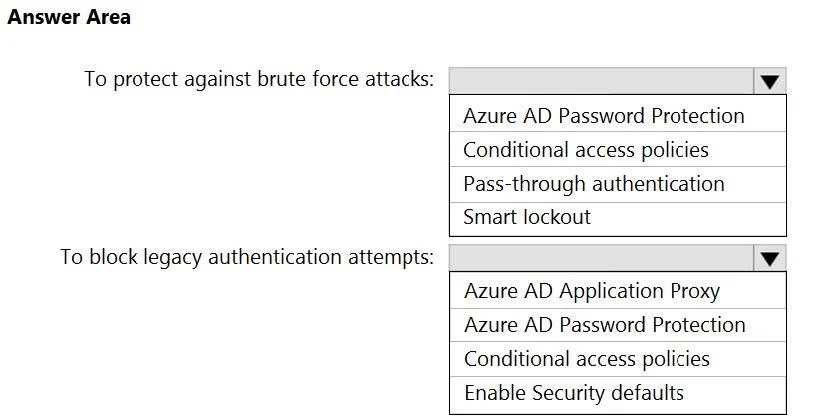
Answer Area
- To protect against brute force attacks:Azure AD Password ProtectionConditional access policiesPass-through authenticationSmart lockout
- To block legacy authentication attempts:Azure AD Application ProxyAzure AD Password ProtectionConditional access policiesEnable Security defaults
Explanation
This question tests knowledge of Azure AD security features available in the Free tier and how to protect both cloud and on-premises accounts from attacks while minimizing costs.
Approach. For preventing AD domain user accounts from being locked out due to brute force attacks on Azure AD, the correct recommendation is Azure AD Password Protection. Azure AD Password Protection is available for free and can be extended to on-premises AD via the on-premises agent, protecting domain accounts by applying the same banned password lists and smart lockout policies on-premises - preventing attackers from locking out AD accounts through repeated failed attempts synced back. For blocking legacy authentication attempts to Azure AD integrated apps, the correct recommendation is Azure AD Conditional Access policies; however, since the tenant uses the Free edition, Conditional Access is NOT available. Instead, the correct answer here is Security Defaults, which is free and available in all Azure AD tiers. Security Defaults automatically blocks legacy authentication protocols (like SMTP AUTH, IMAP, POP3, older Office clients) to Azure AD integrated apps at no additional cost, making it the cost-minimizing solution.
Concept tested. The key concepts tested are: (1) Azure AD Password Protection and its ability to extend smart lockout and banned password enforcement to on-premises Active Directory Domain Services, preventing AD lockouts caused by brute-force attacks on Azure AD; (2) Azure AD Security Defaults as a free, built-in feature that blocks legacy authentication protocols across all Azure AD Free tenants, as opposed to Conditional Access which requires Azure AD Premium P1 or P2 and would increase costs.
Reference. https://learn.microsoft.com/en-us/azure/active-directory/authentication/concept-password-ban-bad-on-premises | https://learn.microsoft.com/en-us/azure/active-directory/fundamentals/concept-fundamentals-security-defaults
Topics
Community Discussion
No community discussion yet for this question.