
AZ-305 · Question #197
Hotspot Question You have an Azure Active Directory (Azure AD) tenant. You plan to use Azure Monitor to monitor user sign-ins and generate alerts based on specific user sign-in events. You need to…
The correct answer is Send Azure AD logs to:: An Azure Log Analytics workspace; Signal type to use for triggering the alerts:: Log. This question tests knowledge of how to set up Azure Monitor alerts for Azure AD sign-in events, specifically which components are needed to capture sign-in logs and trigger alerts.
Question
Exhibit
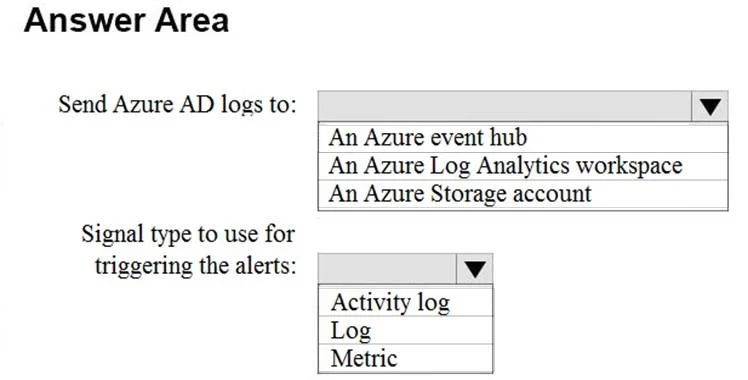
Answer Area
- Send Azure AD logs to:An Azure Log Analytics workspaceAn Azure event hubAn Azure Log Analytics workspaceAn Azure Storage account
- Signal type to use for triggering the alerts:LogActivity logLogMetric
Explanation
This question tests knowledge of how to set up Azure Monitor alerts for Azure AD sign-in events, specifically which components are needed to capture sign-in logs and trigger alerts.
Approach. To monitor Azure AD user sign-ins with Azure Monitor, you must first send Azure AD Sign-in logs to a Log Analytics workspace via Diagnostic Settings. Once the sign-in data is flowing into Log Analytics, you create a Log Analytics (Log) alert rule using a Kusto Query Language (KQL) query targeting the 'SigninLogs' table to detect specific sign-in events. The alert rule is then configured with an Action Group that defines how to notify stakeholders (email, webhook, etc.) when the alert condition is met. The correct components are: (1) Diagnostic Settings to route Azure AD Sign-in logs to Log Analytics, (2) a Log Analytics workspace as the destination, and (3) a Log alert rule (with KQL query on SigninLogs) plus an Action Group to trigger notifications.
Concept tested. Azure Monitor alert pipeline for Azure AD sign-in events: Diagnostic Settings → Log Analytics Workspace → Log Alert Rule (KQL on SigninLogs) → Action Group. This tests understanding of the end-to-end data flow from Azure AD audit/sign-in logs through Azure Monitor to actionable alerts.
Topics
Community Discussion
No community discussion yet for this question.