
AZ-305 · Question #159
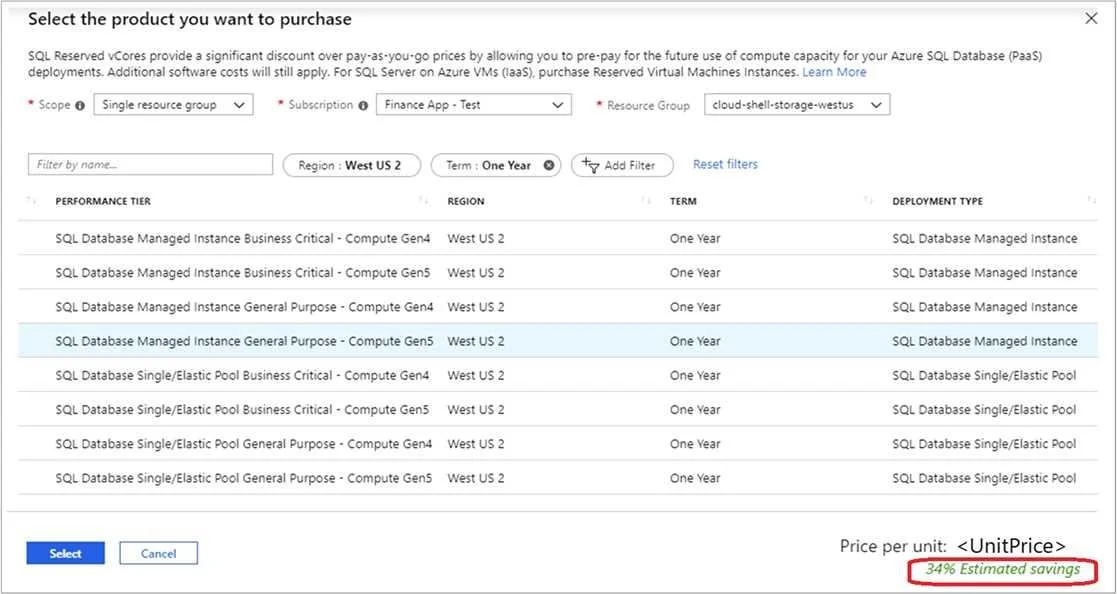
You have an Azure subscription that contains an Azure SQL database. You are evaluating whether to use Azure reservations on the Azure SQL database. Which tool should you use to estimate the…
The correct answer is A. The Purchase reservations blade in the Azure portal. Buy reserved capacity Sign in to the Azure portal. Select All services > Reservations. Select Add and then in the Purchase Reservations pane, select SQL Database to purchase a new reservation for SQL Database. Fill in the required fields. Existing databases in SQL Database and…
Question
Exhibit
Options
- AThe Purchase reservations blade in the Azure portal
- BThe Advisor blade in the Azure portal
- CThe SQL database blade in the Azure portal
How the community answered
(57 responses)- A91% (52)
- B5% (3)
- C4% (2)
Explanation
Buy reserved capacity Sign in to the Azure portal. Select All services > Reservations. Select Add and then in the Purchase Reservations pane, select SQL Database to purchase a new reservation for SQL Database. Fill in the required fields. Existing databases in SQL Database and SQL Managed Instance that match the attributes you select qualify to get the reserved capacity discount. The actual number of databases or managed instances that get the discount depends on the scope and quantity Review the cost of the capacity reservation in the Costs section. Select Purchase. Select View this Reservation to see the status of your purchase. https://docs.microsoft.com/en-us/azure/azure-sql/database/reserved-capacity-overview
Community Discussion
No community discussion yet for this question.