
AZ-204 · Question #541
Drag and Drop Question You are developing a web service that will run on Azure virtual machines that use Azure Storage. You configure all virtual machines to use managed identities. You have the…
The correct answer is http://169.254.169.254/metadata/identity/oauth2/token; import json; json.loads(response.read()). Azure Managed Identity Token Retrieval - Explained Background Azure Managed Identities eliminate the need for secrets/credentials. To get an access token, the VM calls the Azure Instance Metadata Service (IMDS) - a special local endpoint only accessible from within an Azure VM…
Question
Exhibit
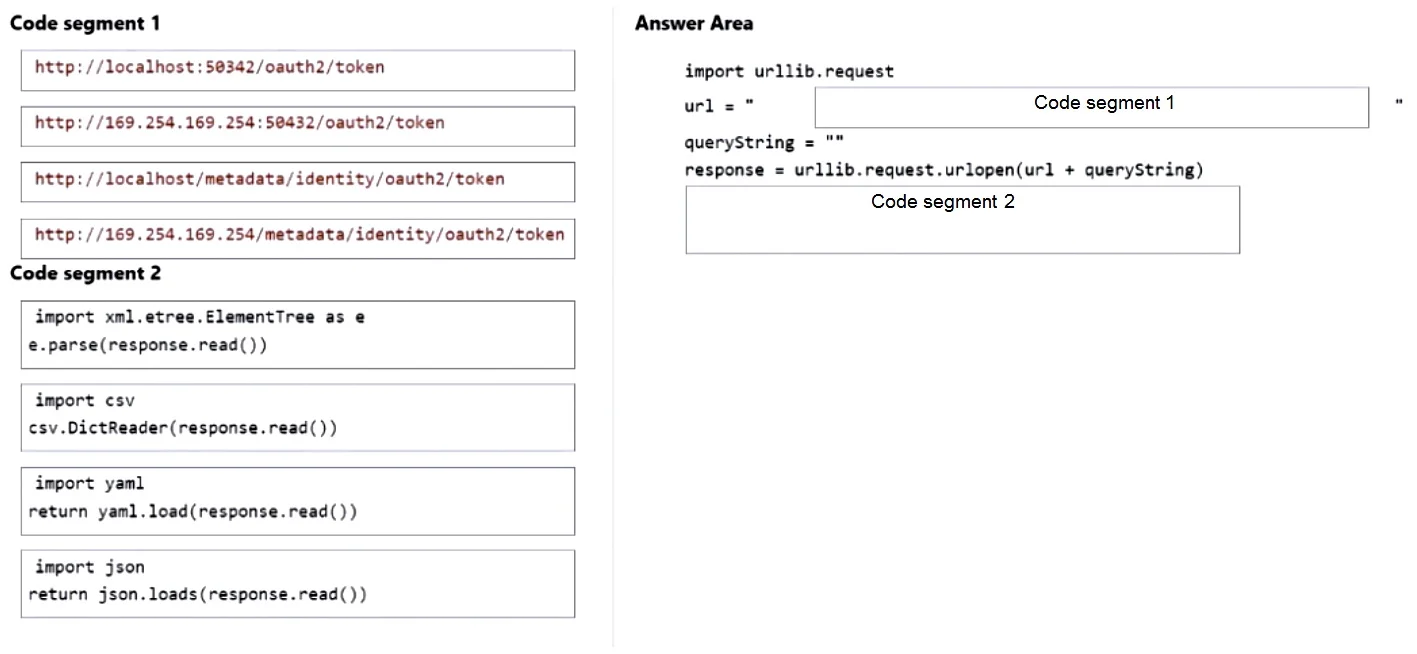
Answer Area
Drag items
Correct arrangement
- http://169.254.169.254/metadata/identity/oauth2/token
- import json
- json.loads(response.read())
Explanation
Azure Managed Identity Token Retrieval - Explained
Background
Azure Managed Identities eliminate the need for secrets/credentials. To get an access token, the VM calls the Azure Instance Metadata Service (IMDS) - a special local endpoint only accessible from within an Azure VM. The code is likely structured like this:
import urllib.request
import json

url = "http://169.254.169.254/metadata/identity/oauth2/token"
params = "?api-version=2018-02-01&resource=https://storage.azure.com/"
req = urllib.request.Request(url + params)
req.add_header('Metadata', 'true')
response = urllib.request.urlopen(req)
token_data = json.loads(response.read())
access_token = token_data['access_token']
Item 1: http://169.254.169.254/metadata/identity/oauth2/token
This is the IMDS endpoint URL.
169.254.169.254is a link-local IP address reserved by Azure specifically for IMDS. It is only reachable from within an Azure VM - not from the public internet.- The requirement explicitly states: "Must use only Azure Instance Metadata Service endpoints." This is that endpoint.
- The path
/metadata/identity/oauth2/tokenis the correct IMDS path for fetching a managed identity token.
Why not the others?
http://localhost/...variants are wrong -localhostis not the IMDS address and would not work for this purpose.http://169.254.169.254/oauth2/tokenis missing the/metadata/identity/path segment - it would return a 404.
Item 2: import json
This is the required import statement.
response.read()returns raw bytes. You need a library to parse the JSON response body into a Python dictionary.- Python's built-in
jsonmodule is the correct choice.
Why not the others?
import csv- CSV is a flat text format; Azure token responses are JSON ({"access_token": "...", "expires_on": "..."})import yaml- YAML is not used here; Azure IMDS returns JSON, not YAML.
Item 3: json.loads(response.read())
This parses the raw HTTP response bytes into a Python dictionary.
- After importing
json, you calljson.loads()on the raw bytes fromresponse.read()to get a usable Python object. - You then access
token_data['access_token']from the result.
Why json.loads(...) and not return json.loads(...)?
- The
returnvariant (return json.loads(response.read())) would only be correct if this code were inside a function. The question's code context places this as an assignment statement, not a return statement. Usingreturnoutside a function causes aSyntaxError.
Why not csv.DictReader(...) or yaml.load(...)?
- Same reason as above - the response is JSON, not CSV or YAML.
Common Mistakes Summary
| Mistake | Why It's Wrong |
|---|---|
Using localhost instead of 169.254.169.254 | localhost is not the IMDS address |
Omitting /metadata/identity/ from the path | Incomplete path, request will fail |
Using csv or yaml to parse the response | IMDS returns JSON, not CSV/YAML |
Using return json.loads(...) as a standalone statement | return outside a function is a SyntaxError |
Topics
Community Discussion
No community discussion yet for this question.