
AZ-204 · Question #5
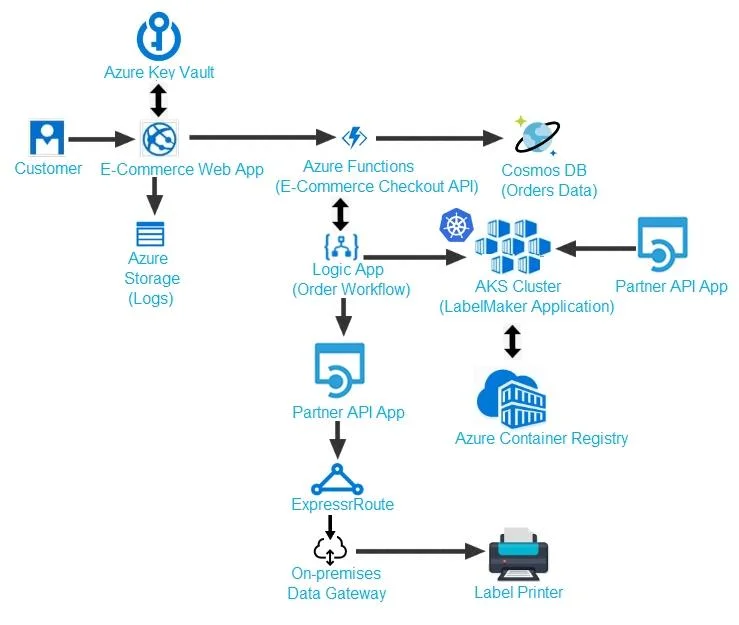
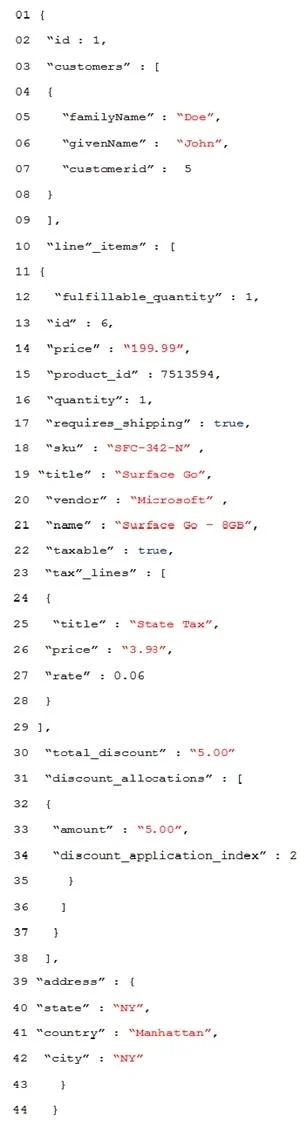
Case Study 2 - Coho Winery LabelMaker app Coho Winery produces bottles, and distributes a variety of wines globally. You are developer implementing highly scalable and resilient applications to…
The correct answer is A. Review the run history. D. Review the trigger history. Scenario: The order workflow fails to run upon initial deployment to Azure. Check runs history: Each time that the trigger fires for an item or event, the Logic Apps engine creates and runs a separate workflow instance for each item or event. If a run fails, follow these steps…
Question
Exhibits
Options
- AReview the run history.
- BReview the activity log.
- CReview the API connections.
- DReview the trigger history.
How the community answered
(31 responses)- A74% (23)
- B16% (5)
- C10% (3)
Explanation
Scenario: The order workflow fails to run upon initial deployment to Azure. Check runs history: Each time that the trigger fires for an item or event, the Logic Apps engine creates and runs a separate workflow instance for each item or event. If a run fails, follow these steps to review what happened during that run, including the status for each step in the workflow plus the inputs and outputs for each step. Check the workflow's run status by checking the runs history. To view more information about a failed run, including all the steps in that run in their status, select the failed run. Check the trigger's status by checking the trigger history To view more information about the trigger attempt, select that trigger event, for example: https://docs.microsoft.com/en-us/azure/logic-apps/logic-apps-diagnosing-failures
Topics
Community Discussion
No community discussion yet for this question.