nerdexam
MicrosoftMicrosoft

AZ-204 · Question #2

AZ-204 Question #2: Real Exam Question with Answer & Explanation

The question appears to be incomplete - the drag-and-drop options and correct arrangement are both empty arrays, making it impossible to evaluate specific answer choices or provide targeted reasoning about correct vs. incorrect options. Based on the Litware Inc. case study contex

Submitted by eva_at· Mar 30, 2026Design and Implement Azure Compute, Storage, and Integration Solutions - specifically understanding how to architect a multi-component SaaS solution using Azure App Service, Azure Files for shared storage, Azure SQL for relational data, and supporting services for notifications and document processing.

Question

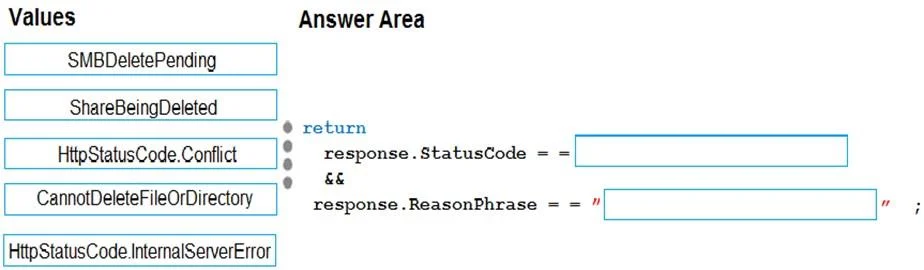
Case Study 1 - Litware Inc Background You are a developer for Litware Inc., a SaaS company that provides a solution for managing employee expenses. The solution consists of an ASP.NET Core Web API project that is deployed as an Azure Web App. Overall architecture Employees upload receipts for the system to process. When processing is complete, the employee receives a summary report email that details the processing results. Employees then use a web application to manage their receipts and perform any additional tasks needed for reimbursement. Receipt processing Employees may upload receipts in two ways: Uploading using an Azure Files mounted folder Uploading using the web application Data Storage Receipt and employee information is stored in an Azure SQL database. Documentation Employees are provided with a getting started document when they first use the solution. The documentation includes details on supported operating systems for Azure File upload, and instructions on how to configure the mounted folder. Solution details Users table Web Application You enable MSI for the Web App and configure the Web App to use the security principal name WebAppIdentity. Processing Processing is performed by an Azure Function that uses version 2 of the Azure Function runtime. Once processing is completed, results are stored in Azure Blob Storage and an Azure SQL database. Then, an email summary is sent to the user with a link to the processing report. The link to the report must remain valid if the email is forwarded to another user. Logging Azure Application Insights is used for telemetry and logging in both the processor and the web application. The processor also has TraceWriter logging enabled. Application Insights must always contain all log messages. Requirements Receipt processing Concurrent processing of a receipt must be prevented. Disaster recovery Regional outage must not impact application availability. All DR operations must not be dependent on application running and must ensure that data in the DR region is up to date. Security Users' SecurityPin must be stored in such a way that access to the database does not allow the viewing of SecurityPins. The web application is the only system that should have access to SecurityPins. All certificates and secrets used to secure data must be stored in Azure Key Vault. You must adhere to the principle of least privilege and provide privileges which are essential to perform the intended function. All access to Azure Storage and Azure SQL database must use the application's Managed Service Identity (MSI) Receipt data must always be encrypted at rest. All data must be protected in transit User's expense account number must be visible only to logged in users. All other views of the expense account number should include only the last segment, with the remaining parts obscured. In the case of a security breach access to all summary reports must be revoked without impacting other parts of the system. Issues Upload format issue Employees occasionally report an issue with uploading a receipt using the web application. They report that when they upload a receipt using the Azure File Share, the receipt does not appear in their profile. When this occurs, they delete the file in the file share and use the web application, which returns a 500 Internal Server error page. Capacity issue During busy periods, employees report long delays between the time they upload the receipt and when it appears in the web application. Log capacity issue Developers report that the number of log message in the trace output for the processor is too high, resulting in lost log messages. Application code Processing.cs Database.cs ReceiptUploader.cs ConfigureSSE.ps1 Drag and Drop Question You need to ensure that the upload format issue is resolved. What code should you add at line RU14? To answer, drag the appropriate code fragments to the correct locations. Each code fragment may be used once, more than once, or not at all. You may need to drag the split bar between panes or scroll to view content. NOTE: Each correct selection is worth one point. Answer:

Explanation

The question appears to be incomplete - the drag-and-drop options and correct arrangement are both empty arrays, making it impossible to evaluate specific answer choices or provide targeted reasoning about correct vs. incorrect options. Based on the Litware Inc. case study context, this type of question typically tests knowledge of Azure architecture components such as Azure Files, Azure SQL, Azure Web Apps, and Azure Blob Storage, requiring candidates to correctly sequence or map architectural elements to their appropriate roles in a receipt-processing pipeline.

Topics

#Azure Web Apps#Azure Files#Azure SQL Database#SaaS Architecture

Community Discussion

No community discussion yet for this question.

Full AZ-204 PracticeBrowse All AZ-204 Questions