
AZ-204 · Question #411
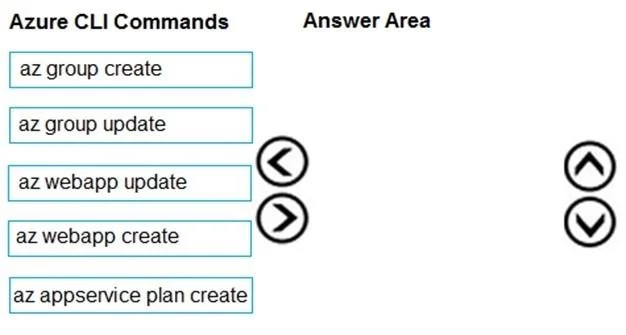
Drag and Drop Question You are developing a Docker/Go using Azure App Service Web App for Containers. You plan to run the container in an App Service on Linux. You identify a Docker container image…
The correct answer is az group create; az appservice plan create; az webapp create. The correct sequence follows the logical Azure resource hierarchy: first create a resource group (az group create) in a Linux-supported region to house all resources, then create an App Service Plan with Linux OS configuration (az appservice plan create --is-linux), and finally…
Question
Exhibit
Answer Area
Drag items
Correct arrangement
- az group create
- az appservice plan create
- az webapp create
Explanation
The correct sequence follows the logical Azure resource hierarchy: first create a resource group (az group create) in a Linux-supported region to house all resources, then create an App Service Plan with Linux OS configuration (az appservice plan create --is-linux), and finally create the Web App for Containers pointing to the Docker image (az webapp create --deployment-container-image-name). This three-step sequence is the minimum required to deploy a containerized application on Azure App Service on Linux.
Topics
Community Discussion
No community discussion yet for this question.