
AZ-204 · Question #409
A company is developing a solution that allows smart refrigerators to send temperature information to a central location. You have an existing Service Bus. The solution must receive and store…
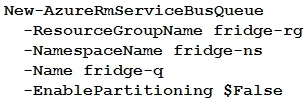
The correct answer is C. New-AzureRmServiceBusQueue -ResourceGroupName fridge-rg -NamespaceName fridge-ns -Name fridge-q -EnablePartitioning $False. Option C is correct because the scenario states the Service Bus namespace already exists and the solution needs to receive and store messages until they can be processed - this requires creating a Service Bus Queue, which is exactly what New-AzureRmServiceBusQueue does. A queue…
Question
Exhibit
Options
- Aaz group create --name fridge-rg --location fridge-loc
- BNew-AzureRmServiceBusNamespace -ResourceGroupName fridge-rg -NamespaceName fridge-ns -Location fridge-loc
- CNew-AzureRmServiceBusQueue -ResourceGroupName fridge-rg -NamespaceName fridge-ns -Name fridge-q -EnablePartitioning $False
- DGet-AzureRmServiceBusKey -ResourceGroupName fridge-rg -Namespace fridge-ns -Name RootManageSharedAccessKey
How the community answered
(55 responses)- A5% (3)
- B4% (2)
- C89% (49)
- D2% (1)
Explanation
Option C is correct because the scenario states the Service Bus namespace already exists and the solution needs to receive and store messages until they can be processed - this requires creating a Service Bus Queue, which is exactly what New-AzureRmServiceBusQueue does. A queue is the appropriate messaging entity for storing messages until a consumer is ready to process them. The command targets the existing namespace (fridge-ns) within the existing resource group (fridge-rg), completing the configuration as required.
Topics
Community Discussion
No community discussion yet for this question.