
AZ-140 · Question #41
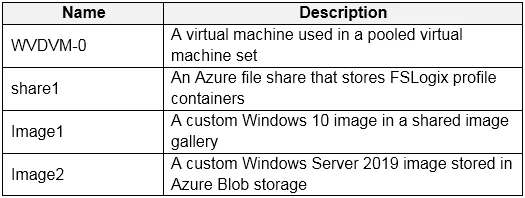
You have an Azure subscription that contains the resources shown in the following table. Which resources can you back up by using Azure Backup?
The correct answer is A. WVDVM-0 and share1 only. Azure Backup natively supports Azure Virtual Machines (like WVDVM-0) and Azure Files shares (like share1). Azure VM Images (Image1, Image2) are pre-built image snapshots used to deploy new VMs - they are not live resources that require backup via Azure Backup. Images are…
Question
You have an Azure subscription that contains the resources shown in the following table. Which resources can you back up by using Azure Backup?
Exhibit
Options
- AWVDVM-0 and share1 only
- BWVDVM-0 only
- CWVDVM-0, Image1, and Image2 only
- DWVDVM-0, share1, and Image1 only
- EWVDVM-0, share1, Image1, and Image2
How the community answered
(23 responses)- A87% (20)
- B4% (1)
- D4% (1)
- E4% (1)
Explanation
Azure Backup natively supports Azure Virtual Machines (like WVDVM-0) and Azure Files shares (like share1). Azure VM Images (Image1, Image2) are pre-built image snapshots used to deploy new VMs - they are not live resources that require backup via Azure Backup. Images are already static, read-only artifacts stored in Azure Compute Gallery or as Managed Images, and are not a supported backup target for Azure Backup. Therefore, only WVDVM-0 (VM) and share1 (Azure Files share) are valid Azure Backup targets.
Topics
Community Discussion
No community discussion yet for this question.