
AZ-140 · Question #161
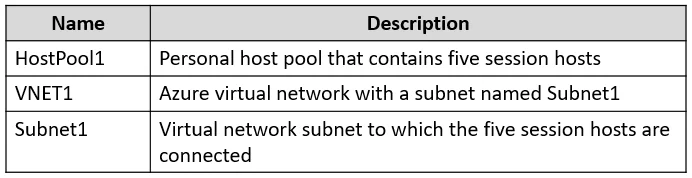
You have an Azure Virtual Desktop deployment that contains the resources shown in the following table. You need to enable just-in-time (JIT) VM access for all the session hosts. What should you do…
The correct answer is B. Assign network security groups (NSGs) to the network interfaces of the five session hosts. Just-in-time (JIT) VM access (via Microsoft Defender for Cloud) works by dynamically modifying NSG rules to block and open management ports (e.g., RDP 3389) on demand. For Defender for Cloud to manage JIT policies on a VM, an NSG must be associated with that VM's network…
Question
You have an Azure Virtual Desktop deployment that contains the resources shown in the following table. You need to enable just-in-time (JIT) VM access for all the session hosts. What should you do first?
Exhibit
Options
- ADeploy Azure Bastion to VNET1.
- BAssign network security groups (NSGs) to the network interfaces of the five session hosts.
- CConfigure Access control (IAM) for HostPool1.
- DAssign a network security group (NSG) to Subnet1.
How the community answered
(53 responses)- A4% (2)
- B75% (40)
- C6% (3)
- D15% (8)
Explanation
Just-in-time (JIT) VM access (via Microsoft Defender for Cloud) works by dynamically modifying NSG rules to block and open management ports (e.g., RDP 3389) on demand. For Defender for Cloud to manage JIT policies on a VM, an NSG must be associated with that VM's network interface. If the session hosts have no NSGs assigned to their NICs, Defender for Cloud cannot configure or enforce JIT rules for them. Assigning NSGs to the NICs of all five session hosts is therefore the required first step. Option D (subnet NSG) is a distractor - JIT operates at the NIC-level NSG to provide per-VM control. Options A and C are unrelated to the JIT prerequisite.
Topics
Community Discussion
No community discussion yet for this question.