
AZ-140 · Question #160
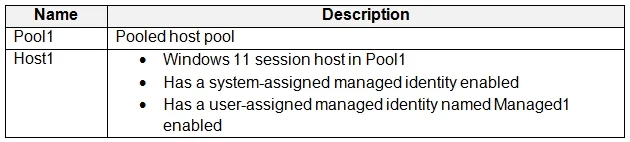
You have an Azure Virtual Desktop deployment that contains the resources shown in the following table. You plan to enable Start VM on connect for Pool1. You create a custom Azure role named Role1…
The correct answer is B. Azure Virtual Desktop. The 'Start VM on Connect' feature works by having the Azure Virtual Desktop service itself power on a deallocated session host when a user initiates a connection. To do this, the AVD service must have permission to start VMs in the subscription. Role1 (with VM start…
Question
You have an Azure Virtual Desktop deployment that contains the resources shown in the following table. You plan to enable Start VM on connect for Pool1. You create a custom Azure role named Role1 that has sufficient permissions to start virtual machines on demand. You need to ensure that the session hosts in Pool1 can start on demand. To which service principal should you assign Role1?
Exhibit
Options
- AManaged1
- BAzure Virtual Desktop
- CAzure Automation
- DHost1
- EAzure Compute
How the community answered
(22 responses)- A5% (1)
- B77% (17)
- C5% (1)
- E14% (3)
Explanation
The 'Start VM on Connect' feature works by having the Azure Virtual Desktop service itself power on a deallocated session host when a user initiates a connection. To do this, the AVD service must have permission to start VMs in the subscription. Role1 (with VM start permissions) must therefore be assigned to the 'Azure Virtual Desktop' service principal (B) - the first-party application registered by Microsoft that acts on behalf of AVD. Assigning it to a managed identity (Managed1), Azure Automation, a specific host (Host1), or Azure Compute would not grant the AVD service the permissions it needs to trigger the on-demand start action.
Topics
Community Discussion
No community discussion yet for this question.