
AZ-120 · Question #399
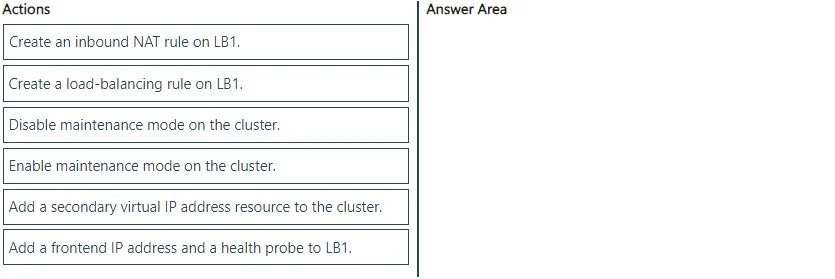
Drag and Drop Question You have two Azure virtual machines. The virtual machines run Red Hat Enterprise Linux (RHEL) and host an SAP HANA 2.0 cluster that has HANA system replication configured. The…
Explanation: HANA Active/Read-Enabled System Replication Configuration Background Standard HANA system replication uses one virtual IP (VIP) - pointing to the primary node. Active/read-enabled adds a second VIP that routes read-only traffic to the secondary node. This requires…
Question
Exhibit
Answer Area
Drag items
Explanation
Explanation: HANA Active/Read-Enabled System Replication Configuration
Background
Standard HANA system replication uses one virtual IP (VIP) - pointing to the primary node. Active/read-enabled adds a second VIP that routes read-only traffic to the secondary node. This requires both Azure Load Balancer changes and cluster resource changes.
The two key requirements drive the ordering logic:
- Minimize maintenance mode duration → do Azure-side (LB) changes before pausing failover
- Maximize resiliency → never leave cluster resources in a partial/inconsistent state
The Correct Sequence
1. Add a frontend IP address and a health probe to LB1
This is an additive Azure infrastructure change - it doesn't touch the running cluster. The new frontend IP becomes the secondary VIP. The health probe allows LB1 to detect which node is the active secondary. Doing this first, outside of maintenance mode, keeps the maintenance window as short as possible.
2. Create a load-balancing rule on LB1
The LB rule ties the new frontend IP to the backend pool using the new health probe. It must come after step 1 because the rule depends on both the frontend IP and the health probe existing. Still an Azure-side change - no cluster disruption yet.
3. Enable maintenance mode on the cluster
Only now do you pause automatic failover. Since all LB changes are already done, the maintenance window covers only the cluster resource change. This directly satisfies "minimize how long resource failover is disabled." Enabling this earlier would extend the window unnecessarily.
4. Add a secondary virtual IP address resource to the cluster
This creates the cluster-managed IP resource that maps to the new LB frontend IP. It must be done while in maintenance mode to prevent the cluster from reacting to the new resource mid-configuration (which could trigger unintended failover or constraint violations).
5. Disable maintenance mode on the cluster
Re-enables automatic failover. The cluster now manages both VIPs - one for primary write traffic, one for secondary read traffic - with full HA behavior restored.
Why "Create an inbound NAT rule" is the Distractor
NAT rules forward specific ports to a specific VM - they're for direct VM access (e.g., SSH). HA virtual IPs require load-balancing rules, which distribute traffic based on health probes across the backend pool. Using a NAT rule would break HA because it pins traffic to one node rather than following the floating VIP.
Common Mistakes
| Mistake | Why it's wrong |
|---|---|
| Enabling maintenance mode before LB changes | Unnecessarily extends failover-disabled window |
| Adding the cluster VIP resource before LB is configured | Health probe doesn't exist yet; cluster resource will fail |
| Using a NAT rule instead of a load-balancing rule | NAT rules don't support floating IPs/HA patterns |
| Forgetting to disable maintenance mode | Cluster never re-enables automatic failover - resiliency is permanently reduced |
Topics
Community Discussion
No community discussion yet for this question.