
AZ-120 · Question #280
Drag and Drop Question You have an Azure subscription that contains a D-series virtual machine named SQL1. You plan to deploy an SAP landscape on Azure that will have Microsoft SQL Server installed…
The correct answer is No Caching; Write Accelerator; Read cache. SAP SQL Server Disk Caching on Azure - Explained This question tests knowledge of Azure disk caching best practices for SAP workloads running SQL Server. There are three disks in play: | # | Disk | Cache Assigned | |---|------|----------------| | 1 | OS Disk | No Caching | | 2…
Question
Drag and Drop Question You have an Azure subscription that contains a D-series virtual machine named SQL1. You plan to deploy an SAP landscape on Azure that will have Microsoft SQL Server installed. You install a SQL server on SQL1 and place databases and logs on separate disks. You need to configure caching for the disks. Which type of cache should you configure for each disk? To answer, drag the appropriate cache types to the correct disks. Each cache type may be used once, more than once, or not at all. You may need to drag the split bar between panes or scroll to view content. NOTE: Each correct selection is worth one point. Answer:
Exhibit
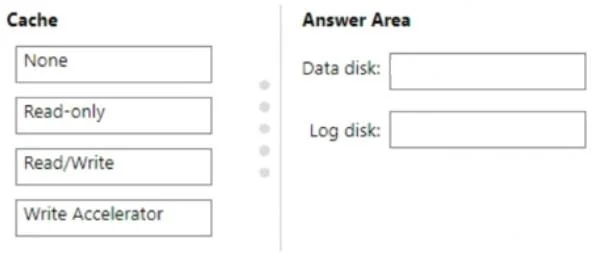
Answer Area
Drag items
Correct arrangement
- No Caching
- Write Accelerator
- Read cache
Explanation
SAP SQL Server Disk Caching on Azure - Explained
This question tests knowledge of Azure disk caching best practices for SAP workloads running SQL Server. There are three disks in play:
| # | Disk | Cache Assigned |
|---|---|---|
| 1 | OS Disk | No Caching |
| 2 | Log Disk (transaction logs) | Write Accelerator |
| 3 | Data Disk (database files) | Read cache |
Placement 1 - OS Disk → No Caching
The OS disk for an SAP workload should use No Caching. The OS performs a mix of reads and writes, but for SAP production systems Microsoft explicitly recommends disabling host caching on the OS disk to avoid stale or inconsistent data during crashes or unexpected reboots. Caching the OS disk adds overhead without meaningful benefit in a database workload context.
Common mistake: Assuming the OS disk should use ReadWrite caching (as you might in a general-purpose VM). SAP-specific guidance overrides the general recommendation.
Placement 2 - Log Disk → Write Accelerator
Transaction log files are write-intensive and latency-critical. SQL Server writes every committed transaction to the log before acknowledging it - this is the core of ACID durability. Write Accelerator is an Azure feature that bypasses the host write cache and writes directly to persistent storage with very low latency, eliminating the risk of data loss while still accelerating throughput.
Key rule: Caching log writes with a standard read/write cache is dangerous - if the host cache is lost before flush, you lose committed transactions. Write Accelerator gives you speed and durability.
Common mistake: Applying Read cache to the log disk. Logs are almost exclusively sequential writes; read caching provides zero benefit and adds risk.
Placement 3 - Data Disk → Read cache
Database data files (MDF files) are read-heavy. SQL Server constantly fetches data pages from disk into its buffer pool. Azure Read-Only host caching keeps frequently accessed pages in fast host memory, reducing disk I/O and improving query response time significantly.
Write operations to data files are handled safely through SQL Server's own checkpoint mechanism, so write-back caching is unnecessary - Read cache is the right fit.
Common mistake: Using No Caching on data disks. This forces every read to hit disk and wastes the performance headroom Azure host caching provides for read workloads.
Summary Rule
Logs = Write Accelerator (write-sensitive, durability-critical) Data files = Read cache (read-heavy, buffer pool support) OS = No Caching (SAP workload guidance)
Topics
Community Discussion
No community discussion yet for this question.