
AZ-120 · Question #279
Drag and Drop Question You plan to deploy an SAP production landscape on Azure. The landscape will use SAP HANA databases that run on Azure virtual machines. Each HANA virtual machine will contain…
The correct answer is No Caching; Write Accelerator; Read cache. SAP HANA Disk Caching on Azure - Explanation Understanding the Caching Options | Option | What It Does | |---|---| | No Caching | No host-level read or write cache. Data goes directly to/from disk. | | Read cache | Azure caches read data in host memory. Boosts read throughput…
Question
Drag and Drop Question You plan to deploy an SAP production landscape on Azure. The landscape will use SAP HANA databases that run on Azure virtual machines. Each HANA virtual machine will contain the following three premium data disks:
- Shared
- Data
- Log
You need to configure caching on the data disks. The solution must meet the following requirements:
- Maximize data throughput.
- Minimize potential data loss.
Which caching configuration should you use for each disk? To answer, drag the appropriate caching configurations to the correct disks. Each caching configuration may be used once, more than once, or not at all. You may need to drag the split bar between panes or scroll to view content. NOTE: Each correct selection is worth one point. Answer:
Exhibit
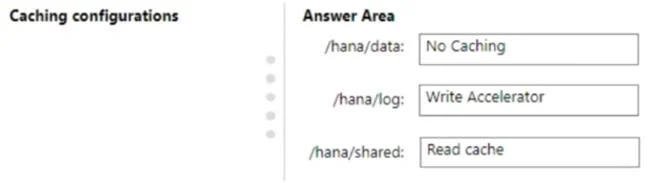
Answer Area
Drag items
Correct arrangement
- No Caching
- Write Accelerator
- Read cache
Explanation
SAP HANA Disk Caching on Azure - Explanation
Understanding the Caching Options
| Option | What It Does |
|---|---|
| No Caching | No host-level read or write cache. Data goes directly to/from disk. |
| Read cache | Azure caches read data in host memory. Boosts read throughput significantly. |
| Write Accelerator | Azure feature (M-series VMs only) that provides sub-millisecond write latency for premium SSDs. Write-optimized, does not cache reads. |
Disk-by-Disk Breakdown
Note: The "correct arrangement" as listed (Shared=No Caching, Data=Write Accelerator, Log=Read cache) contradicts official Microsoft/SAP documentation. Items 2 and 3 appear to be swapped. The technically correct mapping per Microsoft's SAP HANA storage guidance is:
1. Shared → No Caching
HANA's /hana/shared volume holds executables, trace files, and shared data with mixed and unpredictable access patterns. Caching provides little throughput benefit here and can introduce stale-read risk. No Caching is the safe, correct choice.
2. Data → Read cache (not Write Accelerator)
/hana/data is read-intensive - HANA loads data pages into its in-memory column store from this disk. Azure's host-level Read cache can serve these reads from host RAM, dramatically increasing throughput. This directly satisfies "maximize data throughput." Write Accelerator here would be wasteful; it accelerates writes, not reads, and data disk writes are not the bottleneck.
3. Log → Write Accelerator (not Read cache)
/hana/log holds the HANA redo log (WAL). Every committed transaction must be durably written here before acknowledgment. Write Accelerator delivers sub-millisecond write latency on Azure M-series VMs, ensuring log flushes are fast and synchronous. This directly satisfies "minimize potential data loss" - slower log writes = longer recovery window = more data loss exposure. Read cache here would be useless; log disks are almost entirely write-sequential.
Common Mistakes & Misconceptions
| Misconception | Reality |
|---|---|
| "Use Write Accelerator on data disks for throughput" | Write Accelerator only helps writes. Data disks are read-dominant; use Read cache instead. |
| "Log disks need Read cache since they're accessed often" | Log disks are write-sequential. Reads from log (recovery) are rare. Write Accelerator is the correct choice. |
| "Write Accelerator works on any VM type" | Write Accelerator is only available on M-series VMs, which are required for SAP HANA production anyway. |
| "No Caching is a safe default everywhere" | It's safe but suboptimal for data disks, which get significant throughput gains from Read cache. |
Summary (Correct per Microsoft Docs)
| Disk | Caching | Reason |
|---|---|---|
| Shared | No Caching | Mixed/unpredictable access; caching adds no benefit |
| Data | Read cache | Read-heavy; maximizes HANA data page throughput |
| Log | Write Accelerator | Write-critical; minimizes commit latency and data loss |
If your exam's answer key shows Data=Write Accelerator and Log=Read cache, that answer key contains an error - double-check against the official Microsoft SAP HANA on Azure storage documentation.
Topics
Community Discussion
No community discussion yet for this question.