
AZ-120 · Question #104
Drag and Drop Question Your on-premises network contains an Active Directory domain. You are deploying a new SAP environment on Azure. You need to configure SAP Single Sign-On to ensure that users…
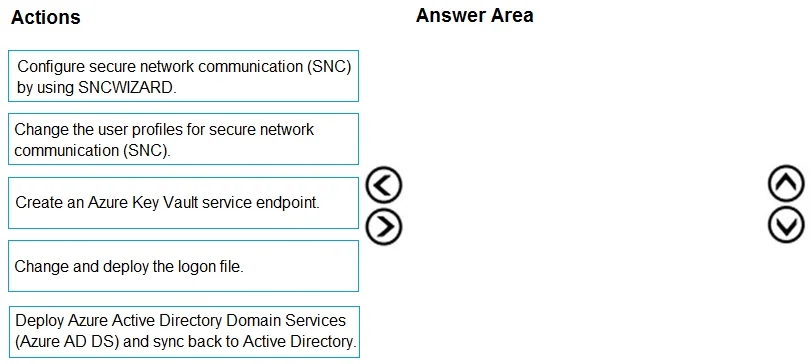
The correct answer is Deploy Azure Active Directory Domain Services (Azure AD DS) and sync back to Active Directory.; Create an Azure Key Vault service endpoint.; Configure secure network communication (SNC) by using SNCWIZARD.; Change the user profiles for secure network communication (SNC). SAP SSO Configuration on Azure - Explanation The Core Concept SAP SSO for SAP GUI and WebGUI uses Kerberos-based authentication delivered through SAP's Secure Network Communications (SNC) layer. The correct sequence follows a strict dependency chain: identity infrastructure →…
Question
Exhibit
Answer Area
Drag items
Correct arrangement
- Deploy Azure Active Directory Domain Services (Azure AD DS) and sync back to Active Directory.
- Create an Azure Key Vault service endpoint.
- Configure secure network communication (SNC) by using SNCWIZARD.
- Change the user profiles for secure network communication (SNC).
Explanation
SAP SSO Configuration on Azure - Explanation
The Core Concept
SAP SSO for SAP GUI and WebGUI uses Kerberos-based authentication delivered through SAP's Secure Network Communications (SNC) layer. The correct sequence follows a strict dependency chain: identity infrastructure → secure storage → system-level SNC config → user-level SNC config.
Why Each Step Is in This Position
Step 1: Deploy Azure AD DS and sync back to Active Directory
This is the non-negotiable foundation. SAP Kerberos SSO requires a domain controller capable of issuing Kerberos tickets. In Azure, that means Azure AD DS, which provides managed Kerberos/NTLM services. The sync from Azure AD DS back to on-premises AD ensures that the same user identities exist in both places, enabling seamless SSO. Nothing else can work without this - you literally have no authentication infrastructure otherwise.
Step 2: Create an Azure Key Vault service endpoint
SNC relies on PKI certificates to establish the secure channel. Azure Key Vault is where those certificates are stored and managed. A service endpoint allows your SAP VNet to reach Key Vault privately (no public internet). This must exist before running SNCWIZARD because SNCWIZARD needs to retrieve certificates during configuration. Skipping this step causes certificate access failures when SNCWIZARD runs.
Step 3: Configure SNC using SNCWIZARD
SNCWIZARD is SAP's automated tool for configuring the SNC layer - it sets up the cryptographic library (CommonCryptoLib), configures SNC partner names, and enables Kerberos. This is system-level configuration. It depends on Step 1 (identity/Kerberos infrastructure) and Step 2 (certificate access) being complete. You cannot configure what doesn't exist yet.
Step 4: Change the user profiles for SNC
Once SNC is working at the system level, each SAP user account needs their SNC name (the Distinguished Name from their certificate) mapped in their SAP user profile (typically via SU01). This is user-level configuration and must come last - you can't map users to an SNC framework that hasn't been set up yet.
The Distractor: "Change and deploy the logon file"
This step applies to a different SSO method - SAP Logon Ticket-based SSO or SAProuter configurations. It is not part of Kerberos/SNC-based SSO. This is the most common wrong answer because it sounds plausible in an SSO context.
Common Mistakes
| Mistake | Why It's Wrong |
|---|---|
| Including the logon file step | That's for ticket-based SSO, not Kerberos/SNC |
| Running SNCWIZARD before Azure AD DS is deployed | No Kerberos KDC = SNCWIZARD has nothing to integrate with |
| Skipping Key Vault service endpoint | SNCWIZARD fails to access certificates at runtime |
| Changing user profiles before SNCWIZARD | SNC framework doesn't exist yet; profiles would reference nothing |
The key mental model: infrastructure first → storage second → system config third → user config last.
Topics
Community Discussion
No community discussion yet for this question.