
AZ-104 · Question #770
Hotspot Question You have a Microsoft Entra tenant that contains the users shown in the following table. The tenant contains the groups shown in the following table. Self-service password reset…
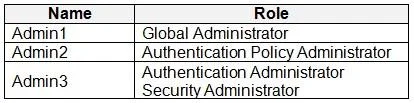
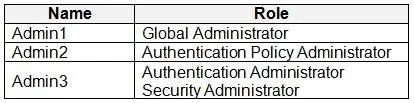
The correct answer is Users:: Admin1 and Admin2 only; Group:: Group1 only. To configure Self-service password reset (SSPR), a user must have one of the following roles: Global Administrator, User Administrator, Authentication Administrator, or Authentication Policy Administrator. For Users: Admin1 has the 'Global Administrator' role, which can…
Question
Exhibits
Answer Area
- Users:Admin1 and Admin2 onlyAdmin1 onlyAdmin2 onlyAdmin 3 onlyAdmin1 and Admin2 onlyAdmin2 and Admin3 onlyAdmin1, Admin2, and Admin3
- Group:Group1 onlyGroup1 onlyGroup2 onlyGroup1 or Group2 onlyGroup1 or Group3 onlyGroup1, Group2, or Group3
Explanation
To configure Self-service password reset (SSPR), a user must have one of the following roles: Global Administrator, User Administrator, Authentication Administrator, or Authentication Policy Administrator.
For Users:
- Admin1 has the 'Global Administrator' role, which can configure SSPR.
- Admin2 has the 'Authentication Policy Administrator' role, which can configure SSPR.
- Admin3 has the 'Security Administrator' role, which cannot configure SSPR. Therefore, Admin1 and Admin2 are the only users who can configure SSPR.
For Groups: SSPR can only be enabled for security groups with an 'Assigned' membership type. It cannot be enabled for dynamic groups or mail-enabled security groups.
- Group1 is a 'Security' group with an 'Assigned' membership type, making it eligible for SSPR.
- Group2 has a 'Dynamic' membership type, which is not supported for SSPR.
- Group3 is a 'Mail-enabled security' group, which is not supported for SSPR. Therefore, SSPR can only be enabled for Group1.
Topics
Community Discussion
No community discussion yet for this question.