
AZ-104 · Question #698
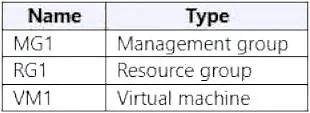
You have an Azure subscription named Sub1 that contains the resources shown in the following table. You create a user named Admin1. To what can you add Admin1 as a co-administrator?
The correct answer is C. Sub1. You can add Admin1 as a co-administrator to the Sub1 subscription. You cannot add Admin1 as a co-administrator to the RG1 resource group, MG1 management group, or VM1 virtual machine. Co-administrators have full access to all resources in a subscription, including the ability…
Question
Exhibits
Options
- ARG1
- BMG1
- CSub1
- DVM1
How the community answered
(26 responses)- B4% (1)
- C96% (25)
Explanation
You can add Admin1 as a co-administrator to the Sub1 subscription. You cannot add Admin1 as a co-administrator to the RG1 resource group, MG1 management group, or VM1 virtual machine. Co-administrators have full access to all resources in a subscription, including the ability to create, read, update, and delete resources. To add Admin1 as a co-administrator to Sub1: In the Azure portal, navigate to Sub1. Click Access control (IAM). Click Assign role. Select the Co-Administrator role. Select Admin1 in the Select drop-down list. Once the role has been assigned, Admin1 will have full access to all resources in Sub1. Note: Co-administrators can only be assigned at the subscription scope. You cannot assign co- administrators to resource groups, management groups, or virtual machines.
Community Discussion
No community discussion yet for this question.