
AZ-104 · Question #59
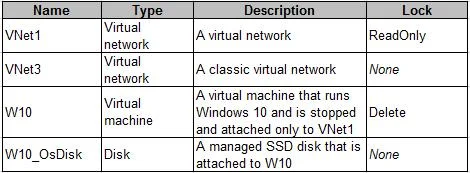
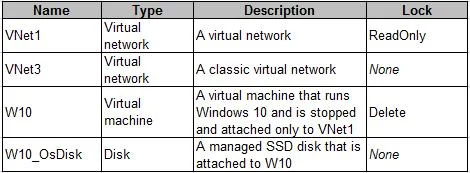
You have an Azure subscription that contains two resource groups named RG1 and RG2. RG2 does not contain any resources. RG1 contains the resources in the following table. Which resource can you move…
The correct answer is B. VNet1. In Azure, you can move resources between resource groups as long as the resource type is supported for move operations. Virtual Networks (VNETs) are supported for move operations, so you can move the "VNET1 - Virtual Network" resource to RG2. The other resources, such as…
Question
Exhibits
Options
- AW10_OsDisk
- BVNet1
- CVNet3
- DW10
How the community answered
(24 responses)- A13% (3)
- B42% (10)
- C8% (2)
- D38% (9)
Explanation
In Azure, you can move resources between resource groups as long as the resource type is supported for move operations. Virtual Networks (VNETs) are supported for move operations, so you can move the "VNET1 - Virtual Network" resource to RG2. The other resources, such as "W10_OsDisk" (Managed Disk), "W10" (Virtual Machine), and "VNET3 - Virtual Network" (Classic Virtual Network), may have limitations or dependencies that prevent them from being moved. Classic resources, like the Classic Virtual Network, have more restrictions on moving compared to Azure Resource Manager (ARM) resources.
Community Discussion
No community discussion yet for this question.