
AZ-104 · Question #536
Hotspot Question You have an Azure subscription named Sub1 that contains the Azure resources shown in the following table. You assign an Azure policy that has the following settings: Scope: Sub1…
The correct answer is RG1 has the Tag2:IT tag assigned only = No; Storage1 has the Tag1:subscription, Tag2:IT, Tag3:value1, and Tag4:value4 tags assigned. = Yes; VNET1 has the Tag2:IT and Tag3:value2 tags assigned only = Yes. Azure Policy Tag Append - Explanation Key Concepts to Understand First "Append a tag" policy - automatically adds a tag to any resource within scope that doesn't already have it. It does not override existing tags. Exclusion path - Sub1/RG1/VNET1 excludes only VNET1…
Question
Exhibits
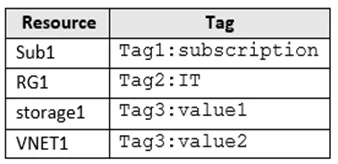
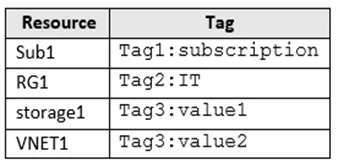
Answer Area
- RG1 has the Tag2:IT tag assigned onlyNo
- Storage1 has the Tag1:subscription, Tag2:IT, Tag3:value1, and Tag4:value4 tags assigned.Yes
- VNET1 has the Tag2:IT and Tag3:value2 tags assigned onlyYes
Explanation
Azure Policy Tag Append - Explanation
Key Concepts to Understand First
"Append a tag" policy - automatically adds a tag to any resource within scope that doesn't already have it. It does not override existing tags.
Exclusion path - Sub1/RG1/VNET1 excludes only VNET1 specifically, not the entire RG1 resource group.
Resource Groups are resources - the policy applies to RGs themselves, not just the resources inside them.
Statement 1: "RG1 has the Tag2:IT tag assigned only" -> No
RG1 was manually assigned Tag2:IT. However, RG1 itself is within Sub1 scope and is not excluded (only VNET1 is excluded). The policy therefore appends Tag4:value4 to RG1.
Result: RG1 has Tag2:IT + Tag4:value4 - not Tag2 only.
Statement 2: "Storage1 has Tag1:subscription, Tag2:IT, Tag3:value1, and Tag4:value4" -> Yes
Storage1 was manually assigned the first three tags. It lives within Sub1 scope and has no exclusion, so the policy appends Tag4:value4.
Result: All four tags are present.
Statement 3: "VNET1 has Tag2:IT and Tag3:value2 only" -> Yes
VNET1 was manually assigned Tag2:IT and Tag3:value2. Critically, the exclusion is Sub1/RG1/VNET1 - VNET1 is explicitly excluded, so the policy does not append Tag4:value4 to it.
Result: Only the two manually assigned tags remain.
Memory Tip
"Exclusion is surgical, not blanket."
ExcludingSub1/RG1/VNET1means ONLY that one resource is exempt. The resource group (RG1) and all other resources in it still fall under the policy. Think of it like a surgical carve-out - only the exact path you specify is protected.
Topics
Community Discussion
No community discussion yet for this question.