
AZ-104 · Question #518
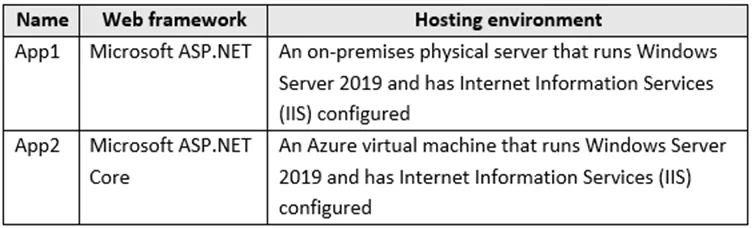
Hotspot Question You have the web apps shown in the following table. You need to monitor the performance and usage of the apps by using Azure Application Insights. The solution must minimize…
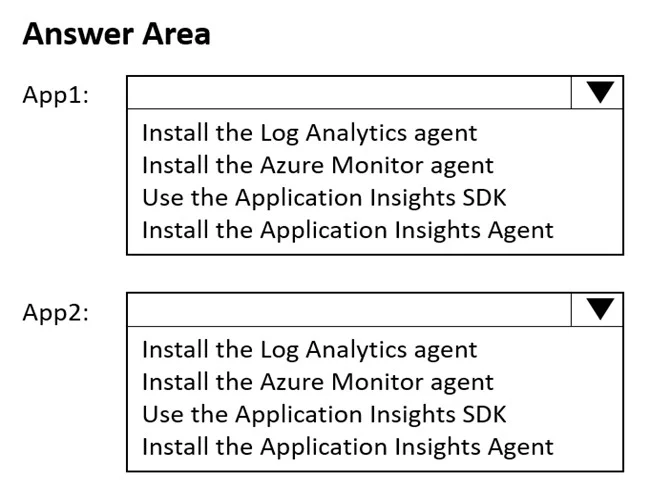
The correct answer is For App1, you should install the Log Analytics agent. = No; For App1, you should install the Azure Monitor agent. = No; For App1, you should use the Application Insights SDK. = No; For App1, you should install the Application Insights Agent. = Yes; For App2, you should install the Log Analytics agent. = No; For App2, you should install the Azure Monitor agent. = No; For App2, you should use the Application Insights SDK. = No; For App2, you should install the Application Insights Agent. = Yes. The Application Insights Agent (formerly called Status Monitor) is the correct choice for App1 because it enables runtime instrumentation of already-deployed applications without requiring any code changes or redeployment - perfectly satisfying the 'minimize modifications to…
Question
Exhibits
Answer Area
- For App1, you should install the Log Analytics agent.No
- For App1, you should install the Azure Monitor agent.No
- For App1, you should use the Application Insights SDK.No
- For App1, you should install the Application Insights Agent.Yes
- For App2, you should install the Log Analytics agent.No
- For App2, you should install the Azure Monitor agent.No
- For App2, you should use the Application Insights SDK.No
- For App2, you should install the Application Insights Agent.Yes
Explanation
The Application Insights Agent (formerly called Status Monitor) is the correct choice for App1 because it enables runtime instrumentation of already-deployed applications without requiring any code changes or redeployment - perfectly satisfying the 'minimize modifications to application code' requirement. It works by attaching to the running process and injecting the necessary telemetry collection automatically. The Log Analytics agent and Azure Monitor agent are general-purpose monitoring agents not designed for application-level performance and usage telemetry (APM), while the Application Insights SDK requires developers to modify and recompile application code, which violates the constraint.
Topics
Community Discussion
No community discussion yet for this question.