
AZ-104 · Question #517
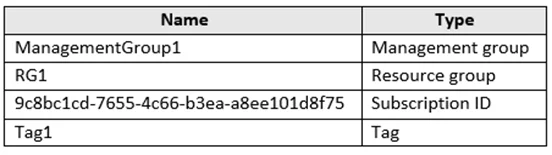
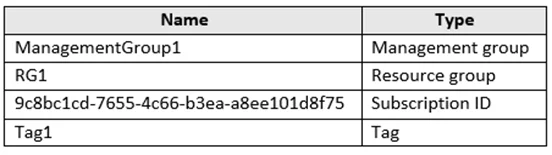
Hotspot Question You have an Azure subscription that contains the resources shown in the following table In Azure Cloud Shell, you need to create a virtual machine by using an Azure Resource Manager…
The correct answer is The command should include 'New-AzResourceGroup'. = No; The command should include 'New-AzResource'. = No; The command should include 'New-AzResourceGroupDeployment'. = Yes; The command should include 'ResourceGroupName RG1' as a tag. = Yes; The command should include 'Subscription ID 9c8bc1cd-7655-4c66-b3ea-a8ee101d8f75' as a tag. = Yes; The command should include 'Tag1' as a tag. = No. To deploy an ARM template in Azure PowerShell, the correct cmdlet is 'New-AzResourceGroupDeployment', which deploys resources defined in a template to an existing resource group. Since the resource group RG1 already exists in the subscription, you specify it using…
Question
Exhibits


Answer Area
- The command should include 'New-AzResourceGroup'.No
- The command should include 'New-AzResource'.No
- The command should include 'New-AzResourceGroupDeployment'.Yes
- The command should include 'ResourceGroupName RG1' as a tag.Yes
- The command should include 'Subscription ID 9c8bc1cd-7655-4c66-b3ea-a8ee101d8f75' as a tag.Yes
- The command should include 'Tag1' as a tag.No
Explanation
To deploy an ARM template in Azure PowerShell, the correct cmdlet is 'New-AzResourceGroupDeployment', which deploys resources defined in a template to an existing resource group. Since the resource group RG1 already exists in the subscription, you specify it using '-ResourceGroupName RG1' rather than creating a new one. The Subscription ID parameter helps target the correct subscription scope when the deployment is executed.
Topics
Community Discussion
No community discussion yet for this question.