
AZ-104 · Question #504
Hotspot Question You have an Azure subscription that contains a storage account named storage1. The subscription is linked to an Azure Active Directory (Azure AD) tenant named contoso.com that syncs…
The correct answer is You can assign the Storage File Data SMB Share Contributor role to User1 for share1. = Yes; You can assign the Storage File Data SMB Share Reader role to Computer1 for share1. = No; You can assign the Storage File Data SMB Share Elevated Contributor role to User2 for share1. = Yes. Azure Files SMB share RBAC roles (Storage File Data SMB Share Contributor, Reader, and Elevated Contributor) can be assigned to users and groups synced from on-premises AD as well as cloud-only Azure AD users. User1 is an on-premises AD user synced to Azure AD, making them…
Question
Exhibits
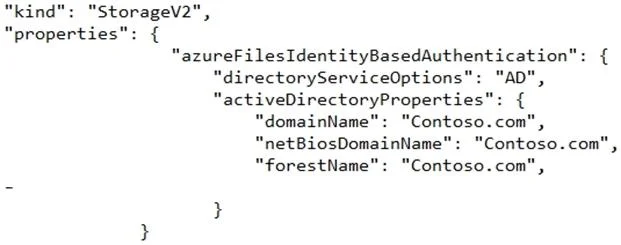
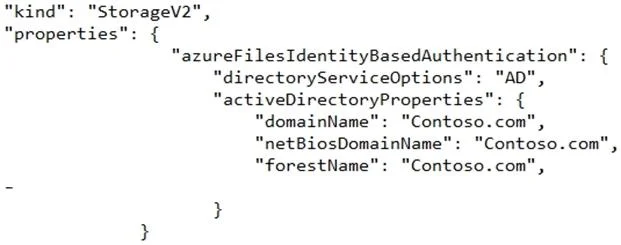
Answer Area
- You can assign the Storage File Data SMB Share Contributor role to User1 for share1.Yes
- You can assign the Storage File Data SMB Share Reader role to Computer1 for share1.No
- You can assign the Storage File Data SMB Share Elevated Contributor role to User2 for share1.Yes
Explanation
Azure Files SMB share RBAC roles (Storage File Data SMB Share Contributor, Reader, and Elevated Contributor) can be assigned to users and groups synced from on-premises AD as well as cloud-only Azure AD users. User1 is an on-premises AD user synced to Azure AD, making them eligible for RBAC role assignments on share1. User2 is a cloud-only Azure AD user and is also eligible for RBAC assignments on Azure file shares. However, Computer1 is a computer account (machine account) from on-premises AD - computer accounts cannot be assigned Azure RBAC roles for Azure Files SMB access, as Azure Files identity-based access only supports user and group security principals, not computer objects.
Topics
Community Discussion
No community discussion yet for this question.