
AZ-104 · Question #503
Drag and Drop Question Your company has an Azure subscription that includes a number of Azure virtual machines (VMs), which are all part of the same virtual network. Your company also has an…
The correct answer is Hyper-V site; Azure Recovery Services Vault; Replication policy. Azure Site Recovery: Replicating Hyper-V VM to Azure This question tests knowledge of Azure Site Recovery (ASR), the service used to replicate on-premises VMs to Azure for disaster recovery. --- Why These Three Items (and in This Order) ASR has a logical setup dependency chain…
Question
Exhibit
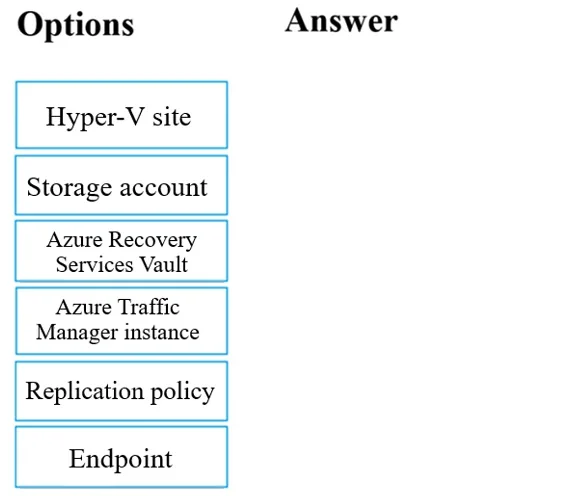
Answer Area
Drag items
Correct arrangement
- Hyper-V site
- Azure Recovery Services Vault
- Replication policy
Explanation
Azure Site Recovery: Replicating Hyper-V VM to Azure
This question tests knowledge of Azure Site Recovery (ASR), the service used to replicate on-premises VMs to Azure for disaster recovery.
Why These Three Items (and in This Order)
ASR has a logical setup dependency chain - each object must exist before the next can be configured.
1. Hyper-V Site
What it is: A logical grouping/container that registers your on-premises Hyper-V host(s) with ASR.
Why first: Before Azure knows anything about your on-premises infrastructure, you must register the Hyper-V server by creating a Hyper-V Site and installing the ASR provider on the host. This is the entry point - nothing else can be configured without Azure recognizing the source machine.
2. Azure Recovery Services Vault
What it is: The central management resource in Azure that stores replication data, recovery points, and configuration for ASR.
Why second: The vault is the Azure-side container that holds everything. You associate the Hyper-V Site to the vault, configure replication targets within it, and monitor jobs through it. It must exist before you can define how replication behaves.
3. Replication Policy
What it is: A set of rules defining replication frequency, recovery point retention, and app-consistent snapshot frequency.
Why third: The replication policy is applied within the vault to govern how VM1 is replicated. It requires both the vault (to attach to) and the Hyper-V site (as the source context) to already exist.
Common Mistakes & Misconceptions
| Mistake | Clarification |
|---|---|
| Selecting Storage Account | ASR manages its own cache storage internally; you don't manually create a storage account for basic ASR replication in modern setups. |
| Selecting Backup Policy | That's for Azure Backup, not Site Recovery - different service, different goal (backup ≠ replication). |
| Selecting Azure AD Identity Protection | Completely unrelated - this is an identity security service. |
| Selecting Azure Traffic Manager | Used for DNS-level traffic routing across regions, not for VM replication. |
| Confusing order of Vault and Hyper-V Site | The Hyper-V Site registration logically comes first because it's the source definition; the vault is the destination container you then link it to. |
Summary Flow
On-premises Hyper-V Host
        ↓
[1] Hyper-V Site (register the source)
        ↓
[2] Recovery Services Vault (Azure-side container)
        ↓
[3] Replication Policy (define replication rules)
        ↓
Enable replication for VM1
This sequence reflects the actual ASR setup wizard order in the Azure portal, which is why understanding the dependency chain matters.
Topics
Community Discussion
No community discussion yet for this question.