
AZ-104 · Question #49
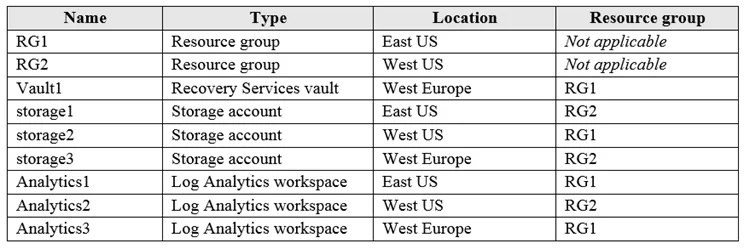
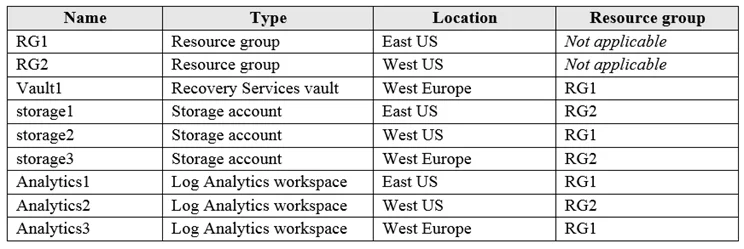
Hotspot Question You have an Azure subscription named Subscription1 that contains the resources shown in the following table: You plan to configure Azure Backup reports for Vault1. You are…
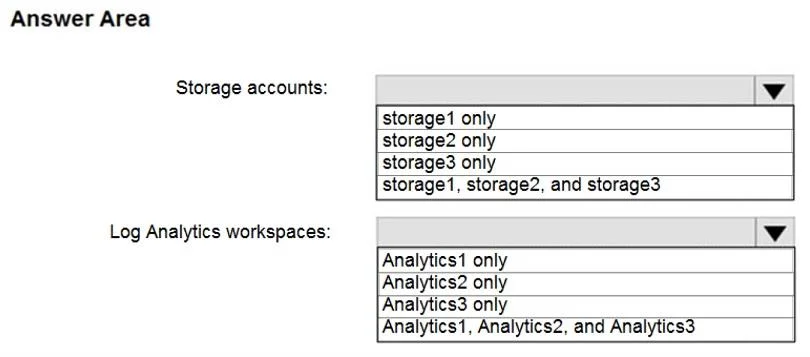
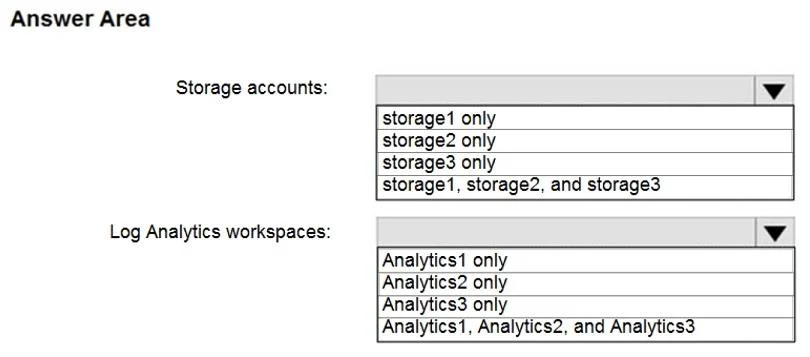
The correct answer is Storage account:: storage3; Log Analytics workspace:: Analytics3. To configure Azure Backup reports, the target storage account must be in the same region as the Recovery Services vault, while Log Analytics workspaces can be in any region.
Question
Exhibits
Answer Area
- Storage account:storage3storage1storage2storage3
- Log Analytics workspace:Analytics3Analytics1Analytics2Analytics3
Explanation
To configure Azure Backup reports, the target storage account must be in the same region as the Recovery Services vault, while Log Analytics workspaces can be in any region.
Approach. The question asks to configure Azure Backup reports for 'Vault1' by setting its Diagnostics settings. Vault1 is located in 'West Europe'.
For Storage Accounts: When configuring diagnostic settings to send logs to a storage account, the storage account must typically be located in the same region as the resource sending the logs. In this case, Vault1 is in 'West Europe'.
storage1is in 'East US' - Incorrect.storage2is in 'West US' - Incorrect.storage3is in 'West Europe' - Correct, as it matches the region of Vault1. Therefore, the correct selection for 'Storage accounts' is 'storage3 only'.
For Log Analytics Workspaces: When configuring diagnostic settings to send logs to a Log Analytics workspace, there are generally no regional restrictions. A Log Analytics workspace can be in a different region, or even a different subscription, from the resource sending the logs.
Analytics1is in 'East US' - Correct.Analytics2is in 'West US' - Correct.Analytics3is in 'West Europe' - Correct. Therefore, the correct selection for 'Log Analytics workspaces' is 'Analytics1, Analytics2, and Analytics3'.
Common mistakes.
- common_mistake. A common mistake is assuming that Log Analytics workspaces also have regional restrictions like storage accounts, or conversely, assuming storage accounts don't have regional restrictions. Selecting 'storage1, storage2, and storage3' for storage accounts is incorrect because only
storage3is in the same region asVault1. Selecting 'Analytics1 only', 'Analytics2 only', or 'Analytics3 only' for Log Analytics workspaces is incorrect because all listed workspaces are valid destinations, as there are no regional constraints when sending logs to a Log Analytics workspace. Another potential mistake is focusing on resource groups instead of regions; while resources in the same RG are often in the same region, it's not a strict rule, and the critical factor for storage accounts here is the region, not the resource group.
Concept tested. Azure Diagnostic Settings configuration, specifically the regional requirements and constraints when sending resource logs to different destinations (Azure Storage Accounts vs. Azure Log Analytics Workspaces). It tests knowledge of Azure resource location compatibility for monitoring and reporting.
Reference. https://learn.microsoft.com/en-us/azure/azure-monitor/essentials/diagnostic-settings
Topics
Community Discussion
No community discussion yet for this question.