
Microsoft
AZ-104 · Question #449
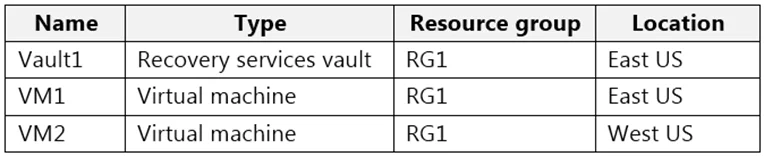
You have an Azure subscription that contains the resources shown in the following table. All virtual machines run Windows Server 2016. On VM1, you back up a folder named Folder1 as shown in the…
The correct answer is B. From VM2, install the Microsoft Azure Recovery Services Agent. https://docs.microsoft.com/en-us/azure/backup/backup-azure-restore-windows-server
Submitted by tom_us· Mar 4, 2026Monitor and back up Azure resources
Question
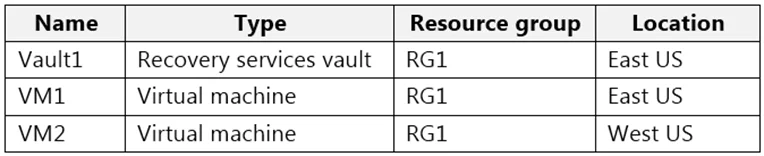
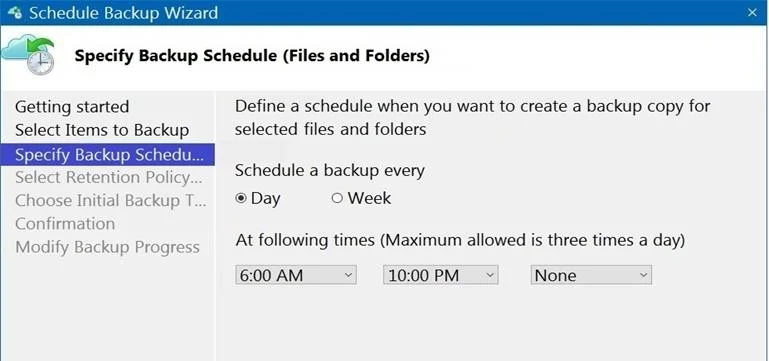
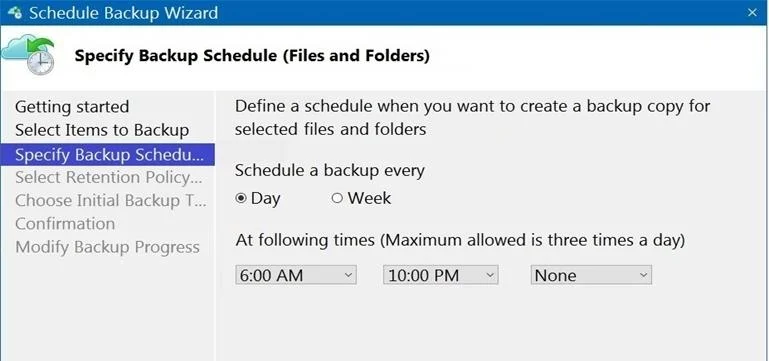
You have an Azure subscription that contains the resources shown in the following table. All virtual machines run Windows Server 2016. On VM1, you back up a folder named Folder1 as shown in the following exhibit. You plan to restore the backup to a different virtual machine. You need to restore the backup to VM2. What should you do first?
Exhibits
Options
- AFrom VM1, install the Windows Server Backup feature.
- BFrom VM2, install the Microsoft Azure Recovery Services Agent.
- CFrom VM1, install the Microsoft Azure Recovery Services Agent.
- DFrom VM2, install the Windows Server Backup feature.
How the community answered
(21 responses)- A5% (1)
- B76% (16)
- C10% (2)
- D10% (2)
Explanation
https://docs.microsoft.com/en-us/azure/backup/backup-azure-restore-windows-server
Community Discussion
No community discussion yet for this question.