
AZ-104 · Question #434
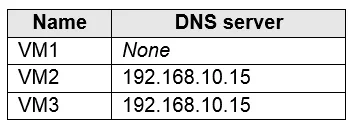
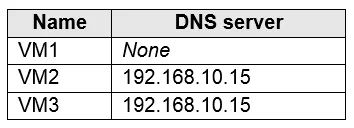
Hotspot Question You have an Azure subscription that contains the Azure virtual machines shown in the following table. You configure the network interfaces of the virtual machines to use the…
The correct answer is VM1 connects to 193.77.134.10 for DNS queries. = Yes; VM2 connects to 193.77.134.10 for DNS queries. = No; VM3 connects to 192.168.10.15 for DNS queries. = Yes. In Azure, DNS settings can be configured at two levels: the Virtual Network (VNet) level and the individual Network Interface (NIC) level. NIC-level DNS settings always override VNet-level DNS settings. VM1 has no custom DNS set at the NIC level, so it inherits the VNet-level…
Question
Exhibits


Answer Area
- VM1 connects to 193.77.134.10 for DNS queries.Yes
- VM2 connects to 193.77.134.10 for DNS queries.No
- VM3 connects to 192.168.10.15 for DNS queries.Yes
Explanation
In Azure, DNS settings can be configured at two levels: the Virtual Network (VNet) level and the individual Network Interface (NIC) level. NIC-level DNS settings always override VNet-level DNS settings. VM1 has no custom DNS set at the NIC level, so it inherits the VNet-level DNS (193.77.134.10). VM2 has a custom DNS configured directly on its NIC (192.168.10.15), which overrides the VNet DNS setting, so it does NOT use 193.77.134.10. VM3 also has a NIC-level DNS setting pointing to 192.168.10.15, which overrides the VNet default, so it correctly uses 192.168.10.15.
Topics
Community Discussion
No community discussion yet for this question.