
AZ-104 · Question #432
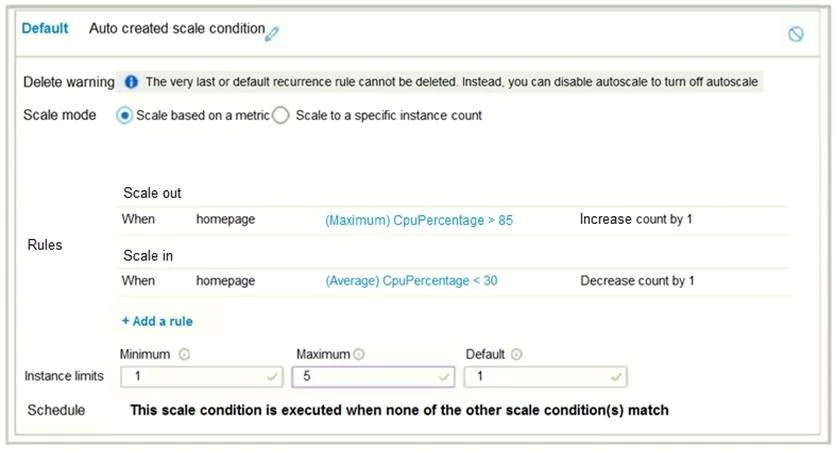
Hotspot Question You have the App Service plan shown in the following exhibit. The scale-in settings for the App Service plan are configured as shown in the following exhibit. The scale out rule is…
The correct answer is If after deployment CPU usage is 70 percent for one hour and then reaches 90 percent for five minutes, at that time the total number of instances will be: 2; If after deployment the CPU maintains constant usage of 90 percent for one hour, and then the average CPU usage is below 25 percent for nine minutes, at that time the total number of instances will be: 4. This question tests understanding of App Service plan autoscale rules, including instance limits, duration, and cool-down periods. The App Service plan is configured with a minimum of 1 and a maximum of 5 instances. Both scale-out and scale-in rules have a duration of 5 minutes…
Question
Exhibits
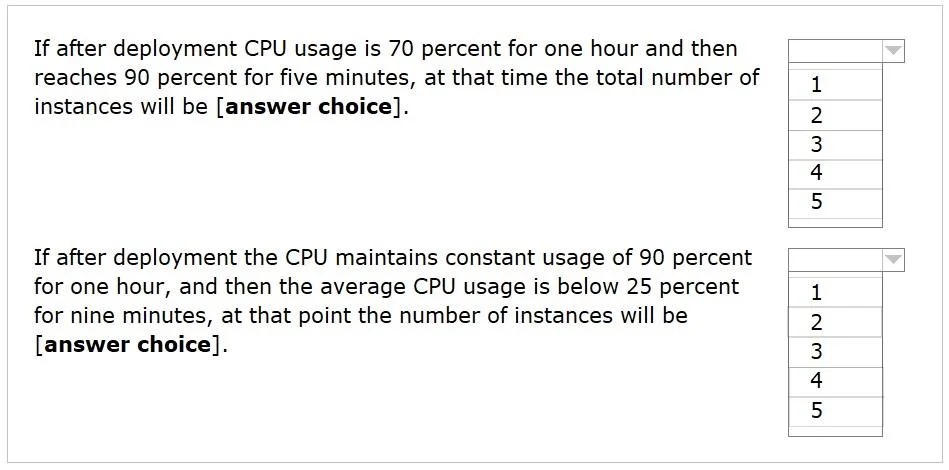
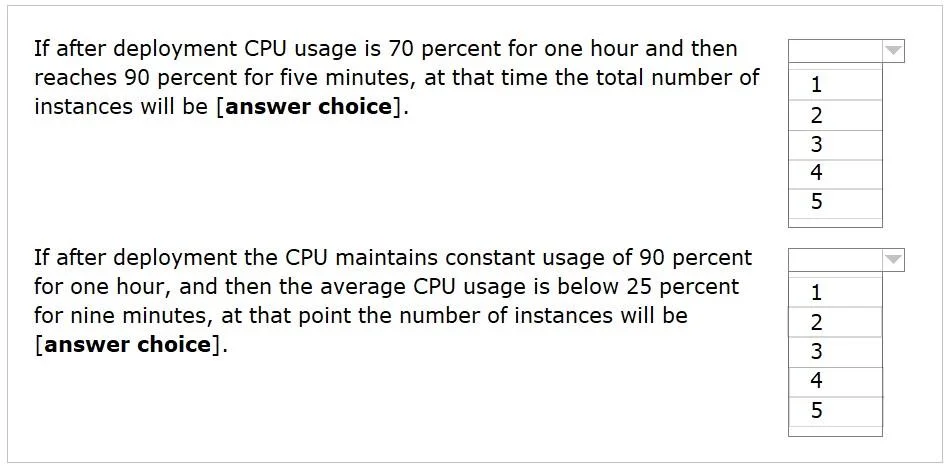
Answer Area
- If after deployment CPU usage is 70 percent for one hour and then reaches 90 percent for five minutes, at that time the total number of instances will be212345
- If after deployment the CPU maintains constant usage of 90 percent for one hour, and then the average CPU usage is below 25 percent for nine minutes, at that time the total number of instances will be412345
Explanation
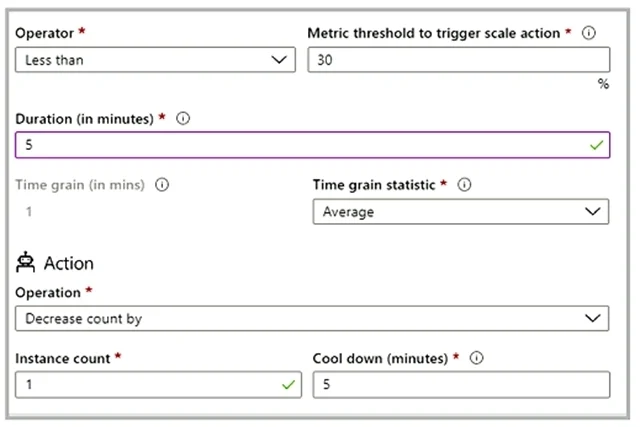
This question tests understanding of App Service plan autoscale rules, including instance limits, duration, and cool-down periods. The App Service plan is configured with a minimum of 1 and a maximum of 5 instances. Both scale-out and scale-in rules have a duration of 5 minutes and a cool-down period of 5 minutes.
Autoscale Rules Summary:
- Scale-out: When CPU usage is greater than 85% for 5 consecutive minutes, increase instance count by 1. A 5-minute cool-down period follows.
- Scale-in: When CPU usage is less than 30% for 5 consecutive minutes, decrease instance count by 1. A 5-minute cool-down period follows.
Scenario 1: If after deployment CPU usage is 70 percent for one hour and then reaches 90 percent for five minutes, at that time the total number of instances will be => 2
- Initial state: The App Service plan begins with 1 instance (the minimum).
- CPU 70% for 1 hour: This CPU usage falls between the scale-out threshold (85%) and the scale-in threshold (30%). No scaling action occurs, and the instance count remains 1.
- CPU 90% for 5 minutes: The CPU usage now exceeds the 85% threshold, and this condition is sustained for the required 5 minutes. This triggers a scale-out action.
- Scale-out action: The instance count increases by 1.
- Result: Total instances = 1 (initial) + 1 (scaled out) = 2.
Scenario 2: If after deployment the CPU maintains constant usage of 90 percent for one hour, and then the average CPU usage is below 25 percent for nine minutes, at that time the total number of instances will be => 4
- Initial state: The App Service plan begins with 1 instance.
- CPU 90% for 1 hour: The CPU usage constantly exceeds 85%, triggering multiple scale-out actions until the maximum instance limit is reached. Each scale-out requires the 5-minute duration condition to be met, followed by a 5-minute cool-down period, making each full scale-out cycle 10 minutes.
- Starting from 1 instance, it scales out to 2 instances after 5 minutes (and enters cooldown).
- After the 5-minute cooldown, it scales out to 3 instances after another 5 minutes (and enters cooldown).
- This pattern continues until it reaches 5 instances:
- 1st scale-out (1→2): after 5 minutes (Total time: 5 mins)
- 2nd scale-out (2→3): after 10 minutes (Total time: 15 mins)
- 3rd scale-out (3→4): after 10 minutes (Total time: 25 mins)
- 4th scale-out (4→5): after 10 minutes (Total time: 35 mins)
- After 35 minutes, the App Service plan reaches its maximum of 5 instances and remains at this count for the rest of the hour.
- Average CPU usage below 25% for 9 minutes: The current instance count is 5. The CPU usage is now below the 30% scale-in threshold.
- After the first 5 minutes of CPU below 25%, a scale-in action is triggered. The instance count decreases by 1 (5 → 4).
- A 5-minute cool-down period begins immediately after this scale-in.
- Remaining time with low CPU: 9 minutes - 5 minutes (used for the first scale-in) = 4 minutes.
- Since only 4 minutes of low CPU remain, this is not enough to meet the 5-minute duration requirement for another scale-in action after the 5-minute cool-down period has elapsed.
- Result: The App Service plan performs only one scale-in action, resulting in a total of 4 instances.
Topics
Community Discussion
No community discussion yet for this question.