
AZ-104 · Question #415
You have a hybrid infrastructure that contains an Azure Active Directory (Azure AD) tenant named contoso.onmicrosoft.com. The tenant contains the users shown in the following table. You plan to…
The correct answer is C. Modify the Directory-wide Groups settings. Ensure that "Enable an 'All Users' group in the directory" policy is set to "Yes" in your Azure Active Directory (AD) settings in order to enable the "All Users" group for centralized access administration. This group represents the entire collection of the Active Directory…
Question
Exhibits
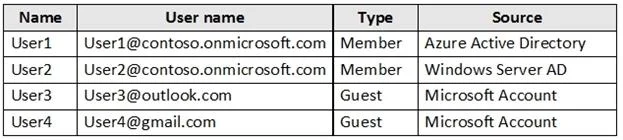
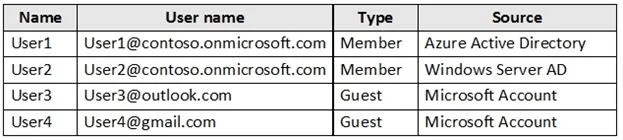
Options
- ACreate a user account of the member type for User4.
- BCreate a user account of the member type for User3.
- CModify the Directory-wide Groups settings.
- DModify the External collaboration settings.
How the community answered
(20 responses)- A15% (3)
- B5% (1)
- C75% (15)
- D5% (1)
Explanation
Ensure that "Enable an 'All Users' group in the directory" policy is set to "Yes" in your Azure Active Directory (AD) settings in order to enable the "All Users" group for centralized access administration. This group represents the entire collection of the Active Directory users, including guests and external users, that you can use to make the access permissions easier to manage within your directory. Incorrect Answers: A, B: User3 and User4 are guests already. Note: By default, all users and guests in your directory can invite guests even if they're not assigned to an admin role. External collaboration settings let you turn guest invitations on or off for different types of users in your organization. You can also delegate invitations to individual users by assigning roles that allow them to invite guests.
Community Discussion
No community discussion yet for this question.