
AZ-104 · Question #390
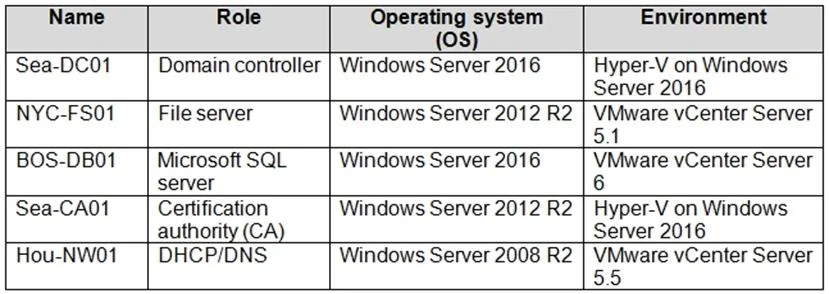
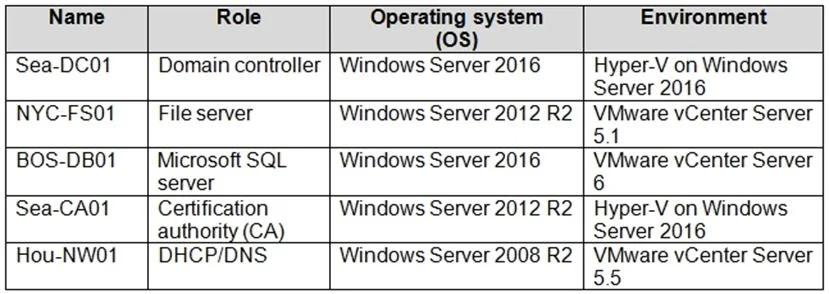
You plan to move services from your on-premises network to Azure. You identify several virtual machines that you believe can be hosted in Azure. The virtual machines are shown in the following…
The correct answer is C. NYC-FS01 E. BOS-DB01. Azure Migrate provides a centralized hub to assess and migrate to Azure on-premises servers, infrastructure, applications, and data. It provides the following: - Unified migration platform: A single portal to start, run, and track your migration to Azure. - Range of tools: A…
Question
Exhibits
Options
- ASea-CA01
- BHou-NW01
- CNYC-FS01
- DSea-DC01
- EBOS-DB01
How the community answered
(18 responses)- A6% (1)
- B6% (1)
- C78% (14)
- D11% (2)
Explanation
Azure Migrate provides a centralized hub to assess and migrate to Azure on-premises servers, infrastructure, applications, and data. It provides the following: - Unified migration platform: A single portal to start, run, and track your migration to Azure. - Range of tools: A range of tools for assessment and migration. Azure Migrate tools include Azure Migrate: Discovery and assessment and Azure Migrate: Server Migration. Azure Migrate also integrates with other Azure services and tools, and with independent software vendor (ISV) - Assessment and migration: In the Azure Migrate hub, you can assess and migrate: Servers, databases, and web apps: Assess on-premises servers including web apps and SQL Server instances and migrate them to Azure virtual machines or Azure VMware Solution (AVS) (Preview). Databases: Assess on-premises databases and migrate them to Azure SQL Database or to SQL Managed Instance. Web applications: Assess on-premises web applications and migrate them to Azure App Virtual desktops: Assess your on-premises virtual desktop infrastructure (VDI) and migrate it to Windows Virtual Desktop in Azure. Data: Migrate large amounts of data to Azure quickly and cost-effectively using Azure Data Box Based on this information let's analyze each option: NYC-FS01 : Its role "Server" fall under above categories. Hence it can be accessed by using BOS-DB01 : Its role "server" fall under above categories. Hence it can be accessed by using Sea-CA01 : Its role "CA" does not fall under above categories. Hence it can not be accessed by using Azure migrate. Hou-NW01 : Its role "DNS" does not fall under above categories. Hence it can not be accessed by using Azure migrate. Sea-DC01 : Its role "DC" does not fall under above categories. Hence it can not be accessed by using Azure migrate. https://docs.microsoft.com/en-us/azure/migrate/migrate-services-overview
Community Discussion
No community discussion yet for this question.