
AZ-104 · Question #385
Hotspot Question You have an Azure subscription named Subscription1. In Subscription1, you create an Azure web app named WebApp1. WebApp1 will access an external service that requires certificate…
The correct answer is Certificate format for HTTPS access:: PFX; Certificate format for external service access:: PFX. The correct certificate formats for an Azure web app are PFX for HTTPS access (requiring a private key) and CER for accessing an external service (likely for trusting or validating the external service's public certificate).
Question
Exhibit
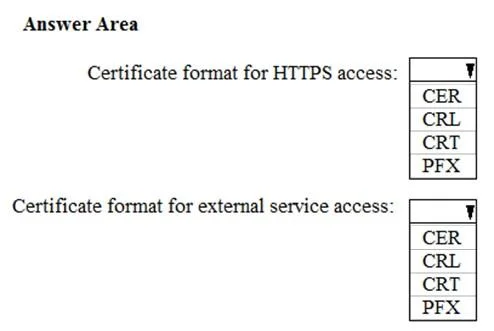
Answer Area
- Certificate format for HTTPS access:PFXCERCRLCRTPFX
- Certificate format for external service access:PFXCERCRLCRTPFX
Explanation
The correct certificate formats for an Azure web app are PFX for HTTPS access (requiring a private key) and CER for accessing an external service (likely for trusting or validating the external service's public certificate).
Approach. To answer this question, the test-taker must select the correct certificate format from the dropdowns for two distinct use cases:
-
Certificate format for HTTPS access: When an Azure web app (WebApp1) requires HTTPS access, it acts as a server. For an HTTPS server to establish a secure TLS connection, it must possess a server certificate that includes both its public key and its corresponding private key. The private key is essential for decrypting incoming encrypted data and for signing parts of the TLS handshake. The PFX (Personal Information Exchange) format is specifically designed to bundle a certificate (public key) and its associated private key into a single, password-protected file. Therefore, PFX is the correct format for enabling HTTPS on WebApp1.
-
Certificate format for external service access: The scenario states 'WebApp1 will access an external service that requires certificate authentication.' This can be interpreted in two main ways: either WebApp1 needs to present a client certificate to the external service (requiring a private key, thus PFX) or WebApp1 needs to validate/trust the external service's certificate (requiring only the public key, thus CER/CRT). Given that the provided answer highlights CER for this purpose, it implies the latter interpretation. In this context, WebApp1 needs to upload the public part of the external service's certificate or a trusted Certificate Authority's (CA) certificate to its trusted store, allowing it to verify the identity of the external service during the connection. CER (Canonical Encoding Rules) or CRT (Certificate) files contain only the public key of a certificate and are suitable for this trust establishment or validation purpose. The question asks for the format to upload to WebApp1 to facilitate access to the external service, and a public key certificate is sufficient for trust establishment.
Common mistakes.
- common_mistake. Selecting incorrect certificate formats can lead to critical security or connectivity issues:
- Selecting CER or CRT for HTTPS access: CER and CRT files typically contain only the public key of a certificate. An HTTPS server requires the private key to perform cryptographic operations (like decrypting session keys) during the TLS handshake. Without the private key, HTTPS cannot be established, making CER/CRT incorrect for server-side HTTPS.
- Selecting PFX for external service access (if only trust is needed): While a PFX file contains a public key, it also contains the private key. If the purpose of uploading the certificate for external service access is purely for trust establishment or validation (i.e., WebApp1 needs to trust the external service's certificate or CA), then a public key format like CER or CRT is sufficient. Uploading a PFX when only the public key is needed is unnecessary and might introduce unneeded private key management complexities.
- Selecting CRL for either purpose: A CRL (Certificate Revocation List) is a list of revoked certificates, not a certificate itself. It is used to check the revocation status of other certificates, not for authentication, encryption, or trust establishment in the way a certificate (public or private key) is used. Therefore, CRL is incorrect for both scenarios.
Concept tested. The core concept tested is the understanding of different X.509 certificate file formats (PFX, CER, CRT, CRL) and their appropriate use cases in secure communication, specifically in the context of Azure Web Apps. This includes distinguishing when a private key is required (e.g., for server-side TLS/SSL, client certificate authentication) versus when only a public key is needed (e.g., for trust establishment, certificate validation, public key distribution).
Reference. null
Topics
Community Discussion
No community discussion yet for this question.