
AZ-104 · Question #302
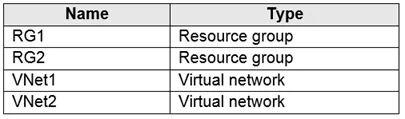
Hotspot Question You have an Azure subscription named Subscription1. Subscription1 contains the resources in the following table. VNet1 is in RG1. VNet2 is in RG2. There is no connectivity between…
The correct answer is From the Azure portal, update the import job = Yes; From the Azure portal, create an import job = No; Attach an external disk to Server1 and then run waimportexport.exe = Yes; Detach the external disks from Server1 and ship the disks to an Azure data center = No. The question as presented appears to have a mismatch between the scenario (moving a VM/application to VNet2) and the answer options (which relate to Azure Import/Export jobs). Based on the answer options provided, the correct actions are: (1) Attach an external disk to Server1…
Question
Exhibits
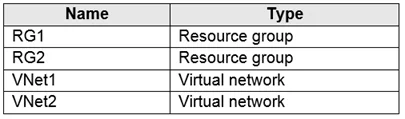
Answer Area
- From the Azure portal, update the import jobYes
- From the Azure portal, create an import jobNo
- Attach an external disk to Server1 and then run waimportexport.exeYes
- Detach the external disks from Server1 and ship the disks to an Azure data centerNo
Explanation
The question as presented appears to have a mismatch between the scenario (moving a VM/application to VNet2) and the answer options (which relate to Azure Import/Export jobs). Based on the answer options provided, the correct actions are: (1) Attach an external disk to Server1 and run waimportexport.exe to prepare and encrypt the data for shipping, and (2) Update the import job from the Azure portal once the disks arrive at the data center. These two steps represent the core workflow of the Azure Import/Export service - preparing disks locally with the WAImportExport tool, then updating the portal job to track the shipment after disks are sent.
Topics
Community Discussion
No community discussion yet for this question.