
AZ-104 · Question #264
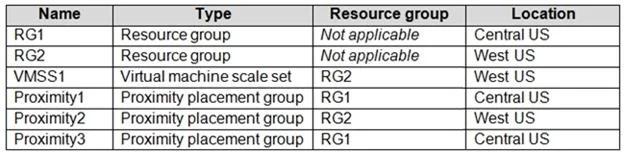
You have an Azure subscription that contains the resources shown in the following table. You need to configure a proximity placement group for VMSS1. Which proximity placement groups should you use?
The correct answer is A. Proximity2 only. Placement Groups is a capability to achieve co-location of your Azure Infrastructure as a Service (IaaS) resources and low network latency among them, for improved application performance. Azure proximity placement groups represent a new logical grouping capability for your…
Question
Exhibits
Options
- AProximity2 only
- BProximity1, Proximity2, and Proximity3
- CProximity1 only
- DProximity1 and Proximity3 only
How the community answered
(21 responses)- A71% (15)
- B5% (1)
- C5% (1)
- D19% (4)
Explanation
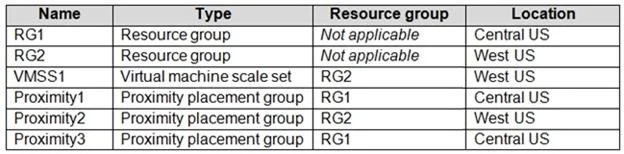
Placement Groups is a capability to achieve co-location of your Azure Infrastructure as a Service (IaaS) resources and low network latency among them, for improved application performance. Azure proximity placement groups represent a new logical grouping capability for your Azure Virtual Machines, which in turn is used as a deployment constraint when selecting where to place your virtual machines. In fact, when you assign your virtual machines to a proximity placement group, the virtual machines are placed in the same data center, resulting in lower and deterministic latency for your applications. The VMSS should share the same region, even it should be the same zone as proximity groups are located in the same data center. Accordingly, it should be proximity 2 only. https://azure.microsoft.com/en-us/blog/introducing-proximity-placement-groups
Community Discussion
No community discussion yet for this question.